3. Certificates
The basic building block of Web PKI.
A Certificate in CertKit represents the desired state of a TLS certificate. You define the domains (SAN list), the key algorithm, lifetime, and the ACME issuer, and we handle the issuance, renewal, and deployment.
Adding a certificate
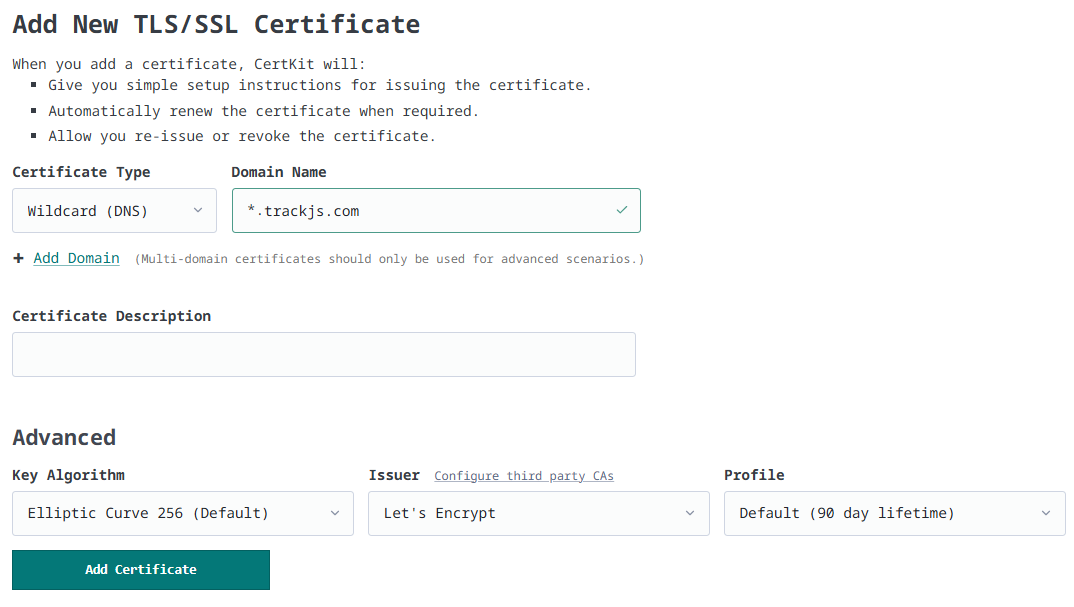
You can add up to 10 SANs. The Advanced section contains settings that affect how the certificate is issued and renewed.
Key Algorithm
We default to EC256, which is recommended for most modern environments. For older software or other reasons you might want something different:
| Reason | Choice |
|---|---|
| Policy requires a larger curve | EC384 |
| Legacy hardware/load balancer only supports RSA | RSA2048 |
| Compliance requires 4096-bit RSA | RSA4096 |
Issuer
Defaults to Let’s Encrypt. Any additional configured issuers appear in the dropdown. The choice of issuer determines which Profiles and Challenge Types are available. Certificates can also be issued from your own private CA — for internal hostnames, IP addresses, and mTLS — which appears in the same dropdown once created.
Profile
Pick a profile based on your desired certificate lifetime:
- Default (90-day lifetime) — Standard ACME certificate.
- Future Proofed (45-day lifetime) — Uses Let’s Encrypt
tlsserverprofile to issue 45 day certs. If you use these you’ll be ready when 47 day certs drop. - Short-Lived (6-day) — Use this to test your automation or if your security policy requires frequent rotations.
Challenge Type
Right now we recomment using DNS-01 as a challenge type. But we do support others.
- DNS-01 - Uses a CNAME at
_acme-challenge.<domain>. - DNS-PERSIST (Coming Soon) - Set one TXT record at
_acme-persist.<domain>once. This removes DNS from the renewal path entirely. Still being ratified in standards committees. - HTTP-01 - Used for single SAN certs. We support this challenge type but don’t recommend it unless you need it for a specific reason. Requires port 80 be open and redirected to CertKit.
Multi-domain certificates
A multi-domain certificate only renews if every SAN validates. If one SAN fails, the entire renewal stalls. For unrelated services, we recommend using separate certificates.
Deployment options
Once we start issuing certificates, you need to deploy them. We recommend using the CertKit agent but there are a number of flexible options depending on your needs.
| Option | When to use it |
|---|---|
| CertKit Agent | The recommended path. Provides automated deployment and status reporting. See Agents. |
| Download Manually | For one-off use where automation isn’t possible. |
| S3-Compatible API | Useful for integrating with tools like Terraform or config management that already support S3. See the Certificate Explorer. |
If your Collection uses a Keystore, private key material is restricted and cannot be downloaded manually.
Additional Contacts
Every certificate has a Certificate Contacts panel on its detail page. CertKit users who get alerts for the Collection are listed there automatically and receive the certificate’s renewal and issuance-problem emails (see Notifications). Below them you can add Additional Contacts: people who need to hear about this one certificate but shouldn’t have a login to your CertKit account. An application owner, the vendor who manages the appliance the certificate lives on, or a security mailing list.
Account administrators add a contact by expanding + Add additional contact, entering a Name and Email, and clicking Add Contact. An additional contact only ever hears about the certificate they’re attached to. They can’t see any other certificates, agents, or Collections.
Including a download link
When you add a contact, you can check Include download link to this certificate. Every time the certificate is issued or renewed, instead of the plain “certificate issued” notice they receive an email sent by CertKit on your behalf with a link to download the new certificate and its private key.
This is for certificates that someone outside your CertKit account deploys. A managed-services vendor that installs certificates on your firewall or load balancer, a third party hosting an application under your domain, or an internal team that owns a system the CertKit agent can’t reach. On each renewal they get the fresh certificate as soon as it’s issued.
How the link works:
- No login required. The link opens a page showing the certificate’s Common Name, SANs, issuer, validity dates, and thumbprint. Before downloading, the contact must confirm the email address the link was sent to.
- Three formats. Certificate + Key, Certificate + Chain + Key, or PFX + Password. Each is a ZIP file, and every one includes the private key, so contacts should treat the email the way they’d treat the key itself.
- Links expire after 7 days. Each issuance sends a new link, and any earlier link for that contact stops working. Removing the contact or revoking the certificate also invalidates the link.
- Send one on demand. Account administrators can click send link now next to a contact to email a fresh link for the current certificate. Useful when onboarding a vendor between renewals, or if a link expired before it was used.
- Status at a glance. The panel shows when the latest link was sent, when it expires, and how many times it has been downloaded.
- Fully audited. Sending a link, downloading through it, and rejected attempts with the wrong email address are all recorded in the Activity Log. Downloads also appear in the certificate’s Access Statistics alongside agent and S3 access, attributed to the contact’s email address.
Removing a Certificate
When you remove a certificate from CertKit, the certificate is not revoked, we simply remove the reference to it from our system. Any systems still using it will continue to function. Effectively you’re breaking the “certificate lineage” by letting it expire naturally.