6. Agents
The easiest way to deploy certificates.
The CertKit Agent is a cross-platform binary installed on your network to automate certificate deployment and monitor internal TLS endpoints. It handles registration, polls for certificate updates, writes certificate material to local destinations, executes post-deployment commands (e.g., service reloads or appliance pushes), and reports the status of assigned intranet hosts.
The agent’s source code is available at github.com/certkit-io/certkit-agent.
Installation and Registration
To register a new agent, copy the registration snippet from the Agents page and run it on the target host.
- Approval: New agents require approval before they’re fully activated. An account administrator must authorize the agent before it can begin syncing. This helps ensure that even if your registration key is used erroneously, there’s an additional step before any certificates will deploy to that host.
- Auto-Updates: The agent supports in-place auto-updates. You can trigger updates for individual agents or use the Update All Now action to update the entire fleet.
If an install or upgrade fails on a host, see Agent Troubleshooting.
If the host requires an outbound HTTP proxy to reach CertKit, see Agent Proxy Configuration.
If antivirus or EDR blocks the agent or its PowerShell deployment scripts, see Antivirus and EDR Exclusions for vendor-specific instructions.
Agent Detail Page
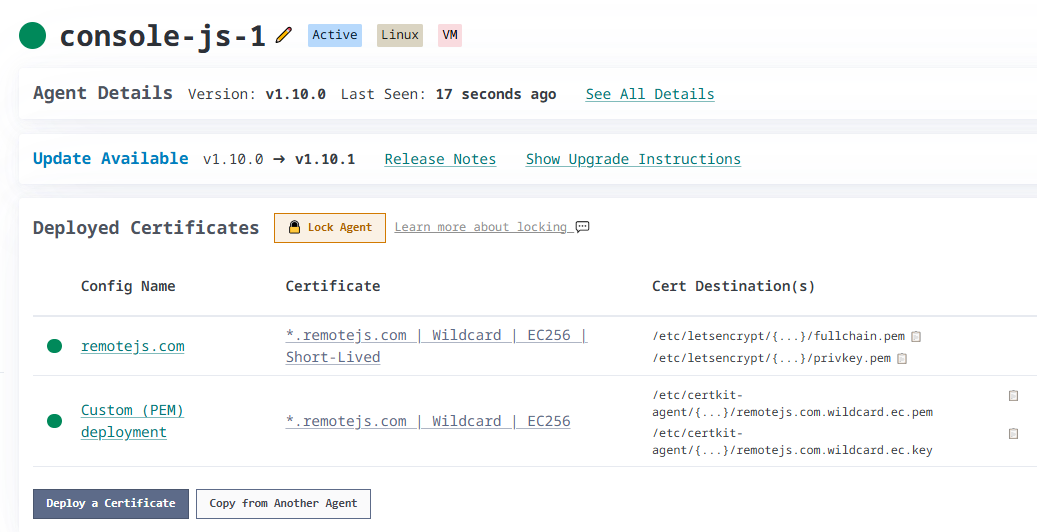
The agent detail page provides a comprehensive view of the host’s identity, software inventory, and active deployment configurations.
Discovered Software
The agent automatically detects running software such as Nginx, Apache, IIS, and RDP. Detected items appear under the Discovered Certificates section, allowing you to create a deployment configuration with pre-filled paths and update commands. See Software Auto-Discovery for more details.
Deployment Configurations
This section lists all deployment configurations assigned to the agent. You can monitor the status of the most recent deployment or manually pause specific configurations. Read more about deployment configurations
Monitored Hosts
This section lists intranet hosts checked by the agent. The agent can monitor any TLS endpoint it can resolve and reach; it does not need to run on the endpoint itself. See Intranet Host Monitoring for setup and network placement guidance.
Security and Management
- Locking: Lock an agent to protect its deployment configurations while certificate renewals and deployments continue. Unlocking requires access to the host. See Agent Locking for when to use it and how to unlock an agent.
- Auto-Updates: Update the agent to the latest version or re-run the installation snippet if required.
Deletion
Deleting an agent removes the agent record and all deployment configurations owned by that agent. Shared configurations (configurations linked to multiple agents) persist on the other linked agents. Intranet hosts assigned to the deleted agent stop being checked until you assign another agent; they do not switch to public cloud monitoring.