Expiration
Every certificate across all your domains, with its expiry date, in one place. Alerts fire as each one approaches expiration, with enough lead time to act.
Certificates always seem to expire at 2am.
SSL certificate monitoring tracks the state of every certificate you run around the clock, on the public internet or inside your network, and alerts you before one expires. It is how a missed renewal stops being a 2am outage and becomes a notice you act on with time to spare.
Monitoring is more than a countdown to an expiry date. These are the six failures that take services down or fail an audit, and a monitoring tool is only as good as the ones it catches:
Every certificate across all your domains, with its expiry date, in one place. Alerts fire as each one approaches expiration, with enough lead time to act.
A validation breaks, or the new certificate never reaches the server. A half-finished deploy leaves the old certificate on one node of a cluster, and everything looks fine until that node takes the request. The renewal that silently failed is more dangerous than the one nobody attempted, because you think it's handled.
A server that doesn't send its intermediate certificate looks fine in Chrome, which fetches the missing piece, and fails in curl, Java, Android, and embedded devices. A revoked or distrusted root breaks trust without the certificate ever expiring.
A good certificate served over TLS 1.0 still fails a security review. A server without TLS 1.3 and a hybrid post-quantum key exchange leaves the traffic recorded today exposed to a future quantum computer.
Every publicly trusted certificate is published to Certificate Transparency logs. Watching those logs for your own domains surfaces certificates issued without your knowledge, by a team that went around you or by someone who shouldn't have one at all.
Internal hostnames, IP addresses, and private CA certificates expire exactly like public ones, and take down internal services just as hard. A monitor that only reaches public endpoints never sees them. CertKit checks them from an agent inside your network.
[ the interactive demo isn't available here ]
See CertKit monitor your own hosts instead.
CertKit makes what many companies struggle with much easier to manage while at the same time providing great value compared to the traditional vendors in the space.
Ben Story, Managed Services Director, RedEye Network Solutions


SSL certificate monitoring is the practice of continuously checking every SSL (TLS) certificate your infrastructure depends on, tracking its expiration and status, and alerting before it causes an outage. That means watching expiration dates, verifying that the signing authority is still trusted, and confirming the certificate on the wire is the one you deployed. It is the verification stage of certificate lifecycle management, the one that tells you whether the other stages worked.
your dashboard          your monitor          TLS endpoint
      │             (cloud or your agent)           │
      │                      │                      │
      │── initiate check ───►│                      │
      │                      │──── TLS handshake ──►│
      │                      │                      ├─ expiry date
      │                      │                      ├─ subject / SANs
      │                      │                      ├─ issuer chain
      │                      │                      ├─ TLS versions
      │                      │                      ├─ key exchange
      │                      │                      ├─ served thumbprint
      │                      │◄─ certificate+chain ─│
      │◄────── status ───────│                      │
      ├─ alerts              │                      │
      └─ history             │                      │
A date in a spreadsheet can't tell you any of this.
Most SSL monitoring tools do expiry monitoring and nothing else: a list of hostnames you maintain, checked for an expiry date. That is the easy part of the problem. When evaluating an SSL cert monitoring tool, check that it covers the rest:
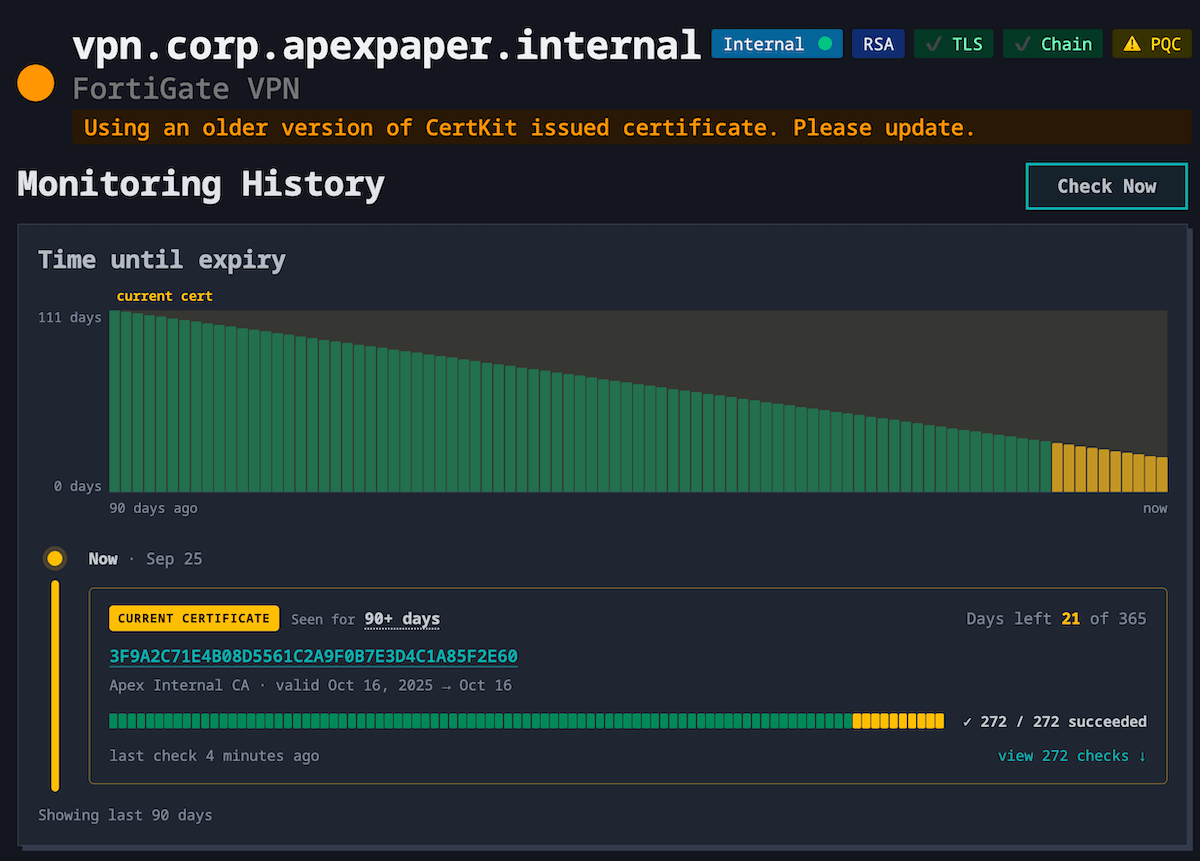
CertKit already renewed this certificate. The VPN is still serving the old one, 21 days from expiring.
A monitor linked to a CertKit-managed certificate knows which certificate should be on the wire. When CertKit deploys a renewal to a host, the monitor for that host checks again right away instead of waiting for its next scheduled run. If the thumbprint being served doesn't match the certificate that was just deployed, the host is flagged as running an older certificate, and you find out within minutes of the deploy.
The link takes care of itself. Add a host as monitoring-only and, if it turns out to be serving a certificate CertKit issued, CertKit links the two and starts checking for that specific certificate.
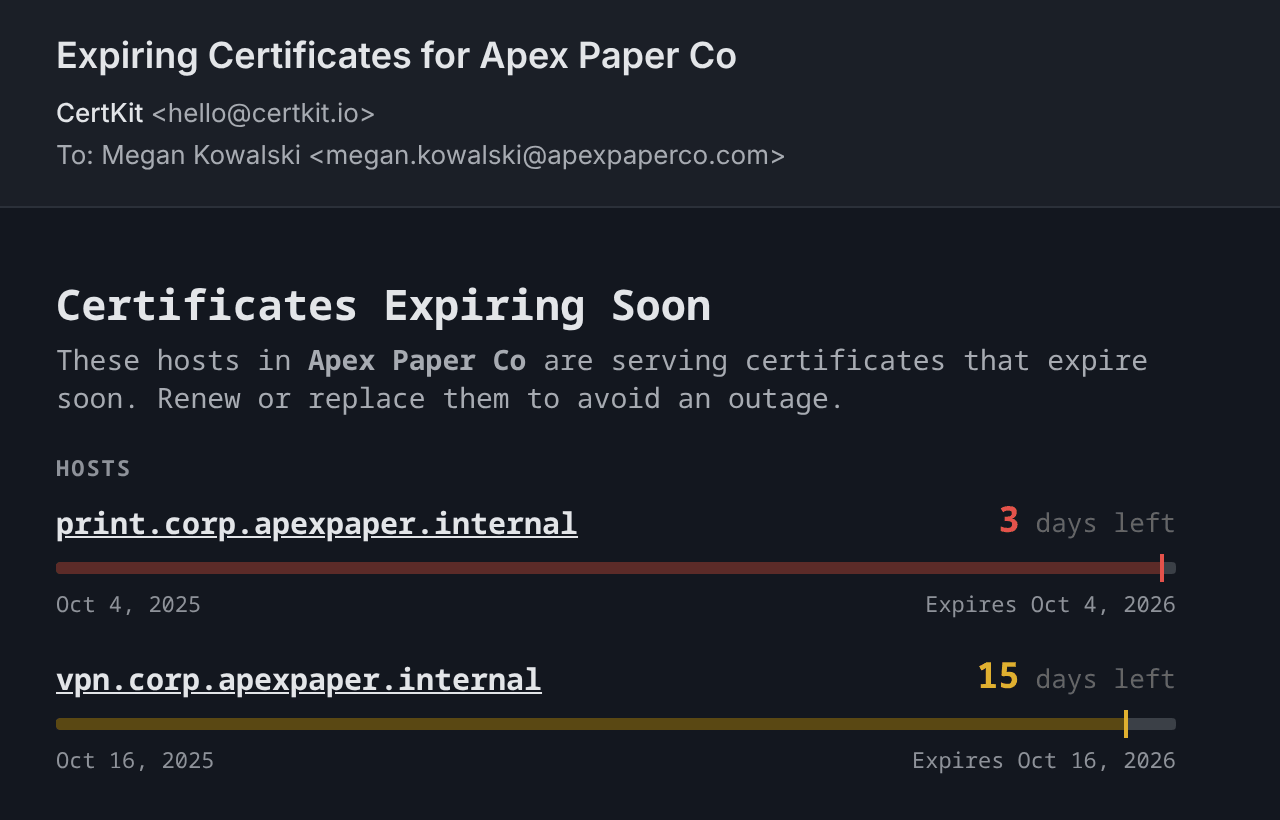
Two hosts crossed an alert line on the same check. The soonest expiry comes first.
When a certificate on a host you monitor gets close to expiring, CertKit sends an email listing every host that's close, whether CertKit manages that certificate or not.
Everyone on the collection gets expiry alerts by default, and you can add outside contacts to a host, like your vendors, business owners, or IT service desk.
Certificate lifetimes are shrinking. The 200-day maximum is already in effect, and the industry is on a path to 47-day certificates by 2029. A renewal that used to happen once a year will need to happen roughly twelve times a year, on every certificate, on every system that serves it.
That changes what monitoring is for. At one renewal a year, a calendar reminder is a reasonable monitoring strategy. At twelve, the renewals blur together, and the question stops being "when does this expire" and becomes "did every one of the last forty renewals land." Monitoring shifts from a countdown to a verification loop, and the loop only closes if renewal and deployment are automated and every certificate is in the inventory to begin with.
The point of certificate expiration monitoring is lead time. Continuous checks mean you get a notice well before an expiry, so a renewal is something handled on a normal workday, with the site still up.
issued                                  renewal           expiry
   ●───────────────────────────────────────●─●───────────────●
                                             ▲
                                alert: renewal due, not yet served
Renewal is due at two-thirds of the lifetime. The alert lands just after, with a third of the lifetime still on the clock.
Expiry alerts are lifetime-aware. A 90-day certificate alerts at 25 days out, and shorter certificates alert closer in, so the same rule works for a one-year certificate and a 47-day one.
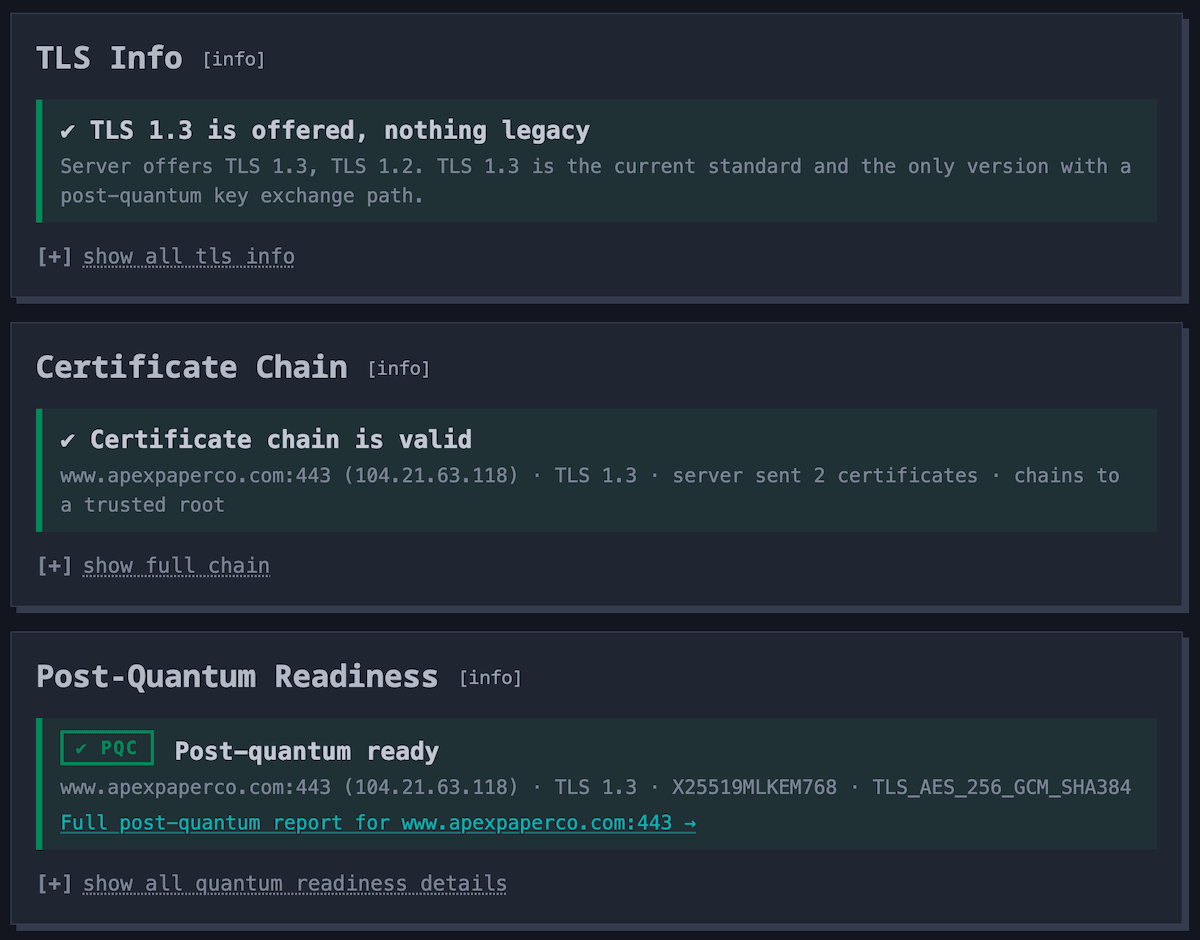
Every host is graded on its chain, its TLS versions, and its post-quantum readiness.
A certificate can be valid and still served wrong. Every public host check also grades three things the expiry date can't tell you: whether the chain the host sends is complete and trusted, which TLS versions it still offers, and whether browsers get a post-quantum key exchange.
That is the protocol inventory a PCI DSS or NIST review asks for. Fix a missing intermediate or turn off TLS 1.1, hit Check Now, and the badge proves it.
Run the same checks on any public server, no account needed.
Most uptime monitoring platforms include an SSL check, and if you already run one, keep it. But the two answer different questions, and the difference matters when a certificate is the thing that broke.
Probes a public URL on a schedule and reports whether it responded. The SSL check is a property of that probe: it sees the certificate on the endpoints you listed, and warns when one is close to expiring.
That covers your public web endpoints well. It does not see a load balancer's management interface, a VPN appliance, a mail server, an internal service, or a certificate that exists but was never added to the list.
Starts from the certificate inventory. It knows what was issued, where each one was deployed, whether the last renewal succeeded, and whether the certificate on the wire matches the one that was supposed to be installed.
It also checks how each endpoint is configured, from the chain it sends to the TLS versions it offers. It covers the certificates with no HTTP endpoint to probe, reaches the hosts that only resolve inside your network, and finds the ones nobody told it about by reading Certificate Transparency logs.
The practical difference is coverage. Uptime monitoring tells you a page is down. Certificate monitoring tells you which certificate did it, on which host, and whether anything else is about to follow.
Expiration dates on every certificate across your domains, whether each renewal succeeds, whether the right certificate is being served on the live endpoint, whether its chain of trust is valid, which TLS versions the endpoint offers, and whether it supports a post-quantum key exchange.
Add the hosts you care about, public or internal, and CertKit checks each one on a schedule and again whenever a certificate is deployed. It tracks the expiration date and status of the certificate being served, alerts you ahead of expiry, and confirms each renewal landed. There is no script to write and nothing to install on the hosts being monitored.
CertKit checks your certificates continuously and alerts you ahead of each expiry, and again if an automated renewal fails. The lead time is the point, so you act with time to spare.
Yes. When CertKit deploys a renewal, the monitor for that host checks again right away and confirms the certificate on the wire is the one just deployed, and catches the old or mismatched one left behind by a half-finished deploy. A mismatch flags the host as running an older certificate.
Yes. Monitoring works on any endpoint the CertKit cloud or one of your agents can reach, including certificates you got elsewhere. It is a good way to get visibility before you automate anything. If a monitoring-only host later starts serving a certificate CertKit issued, it is linked to that certificate automatically.
Yes. Mark a host as internal and choose a CertKit agent to check it from. The agent connects to the host from inside your network, so internal DNS names, single-label hostnames, and private IP addresses all work, and it validates the chain against its own trust store, so certificates from your private CA are checked for trust the same way your users' machines check them. Internal hosts get the same history and alerts as public ones.
Yes, from an agent. An endpoint that demands a client certificate still sends its own certificate first, before it rejects the connection. The agent captures that certificate and checks it, so a SIP gateway, an internal API, or an appliance that enforces mTLS gets the same expiry and trust monitoring as an ordinary HTTPS host.
No. The agent makes outbound connections only, to the host it checks and to CertKit. It performs a TLS handshake, reads the certificate, and reports the result. It doesn't request pages or touch private keys, and nothing connects in from the CertKit cloud.
It depends on what else you run. An uptime monitor covers the public URLs you gave it, which may be all the certificates you have. If you also run appliances, mail servers, internal services, or certificates issued by teams outside your list, those are the ones that expire unnoticed, because nothing is probing them.
Yes, on hosts the CertKit cloud can reach. On SMTP (ports 25 and 587), IMAP (143), POP3 (110), and FTP (21), CertKit upgrades the connection the way a mail or FTP client does (STARTTLS, STLS, or AUTH TLS), then checks the certificate the server presents. Ports that start with TLS, like 465, 993, and 995, are checked like any other TLS endpoint.
Yes. The certificate chain checker shows the full chain a server sends and what's wrong with it. The post-quantum TLS checker shows which TLS versions and key exchanges a server accepts. They run the same checks CertKit monitoring runs on your hosts.
Start a 90-day free trial, no credit card required. Add your domains and CertKit begins monitoring expiration and renewal status right away. Our engineering team helps you set up.
Most teams start by adding the hosts they already run, and on day one they can see every certificate and when it expires. As they automate, each monitor links itself to the certificate CertKit issues and starts checking that the newest one is deployed.
CertKit finds every certificate you have, renews and deploys it automatically, and monitors every one so nothing slips through. Free 90-day trial, no credit card, direct access to our engineering team.