3.5 Certificate Explorer
Browse the S3 bucket that holds your certificate material.
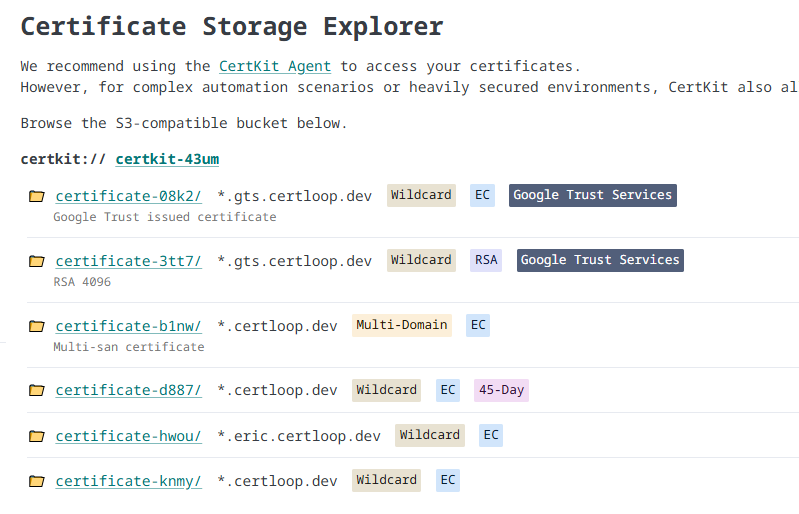
Each Certificate Collection includes an S3-compatible bucket for certificate storage. The Certificate Explorer provides a web-based interface for browsing this bucket. It’s mainly useful if you’re going to write your own scripts to pull or sync certs from CertKit. This will show you the bucket and folder paths to use to get a specific cert.
External Consumption & API Access
The S3-compatible bucket can be accessed directly using standard S3 SDKs, command-line interfaces (CLIs), or infrastructure-as-code tools like Terraform and Ansible. This enables automated, agentless retrieval of certificate material for custom workflows.
Your unique API credentials (Access Key, Secret Key, and endpoint URL) are located at the bottom of the Certificate Explorer page.
S3 Directory & File Structure
CertKit organizes certificate material deterministically inside your S3 bucket. Each certificate intent has its own dedicated folder, and the files within are named according to the certificate’s properties.
- Folder Path: Certificate folders use the pattern
certificate-{certificateId}(e.g.,certificate-abcde). - File Naming Rules: The base filename matches your certificate’s primary domain, appended with indicators for wildcard, multi-domain, and key algorithm:
- Wildcard modifier:
.wildcard(if the certificate covers a wildcard domain). - Multi-SAN modifier:
.multi(if the certificate contains multiple Subject Alternative Names). - Key Curve modifier:
.ec(for EC256 or EC384 keys) or.rsa(for RSA2048 or RSA4096 keys).
- Wildcard modifier:
Output Files
For a certificate with primary domain example.com using EC256 encryption, the following files will be present inside its folder:
| File Name | Format | Description |
|---|---|---|
example.com.ec.pem |
PEM | The full certificate, intermediates, and root CA chain. |
example.com.ec.key |
PEM | The decrypted private key. (Disabled if local Keystore is enabled) |
example.com.ec.pfx |
PKCS#12 | Binary bundle containing certificate, chain, and private key. |
example.com.ec.pfxpassword.txt |
Cleartext | The automatically generated password protecting the PFX file. |
README |
Text | Auto-generated generation metadata and notes. |
GitHub Examples
We have a public S3 provisioning guide that explains in more detail the use cases and gives examples with common S3 CLI tooling to retrieve your certificates.
Limitations
If a Keystore is active for the Collection, the bucket listing is disabled because private key material is stored exclusively on your local infrastructure.