Abstract
Certificate monitoring from the cloud only sees what the internet sees, like your public websites. But the vCenter console, the internal API, the switch management page, or that thing on db01.corp.internal are invisible to it. Those certificates expire just like public ones. They just don’t warn anybody first.
This gap became very clear when we shipped Private PKI. Now CertKit can issue certificates for internal names and IP addresses, deploy them, and install the root into your trust stores.
Today CertKit monitors them too, from inside your network, using the agents you already have there.
Monitor from inside your network
Every monitored host now has a visibility setting, Public or Internal. Public hosts are checked from the CertKit cloud, the same as before. Internal hosts are checked by whatever agent you choose, from wherever it sits in your network. The agent does not need to run on the endpoint itself. It needs to resolve the name the way your users do and reach the port through your routing and firewall rules. One agent in a network segment covers everything it can connect to.
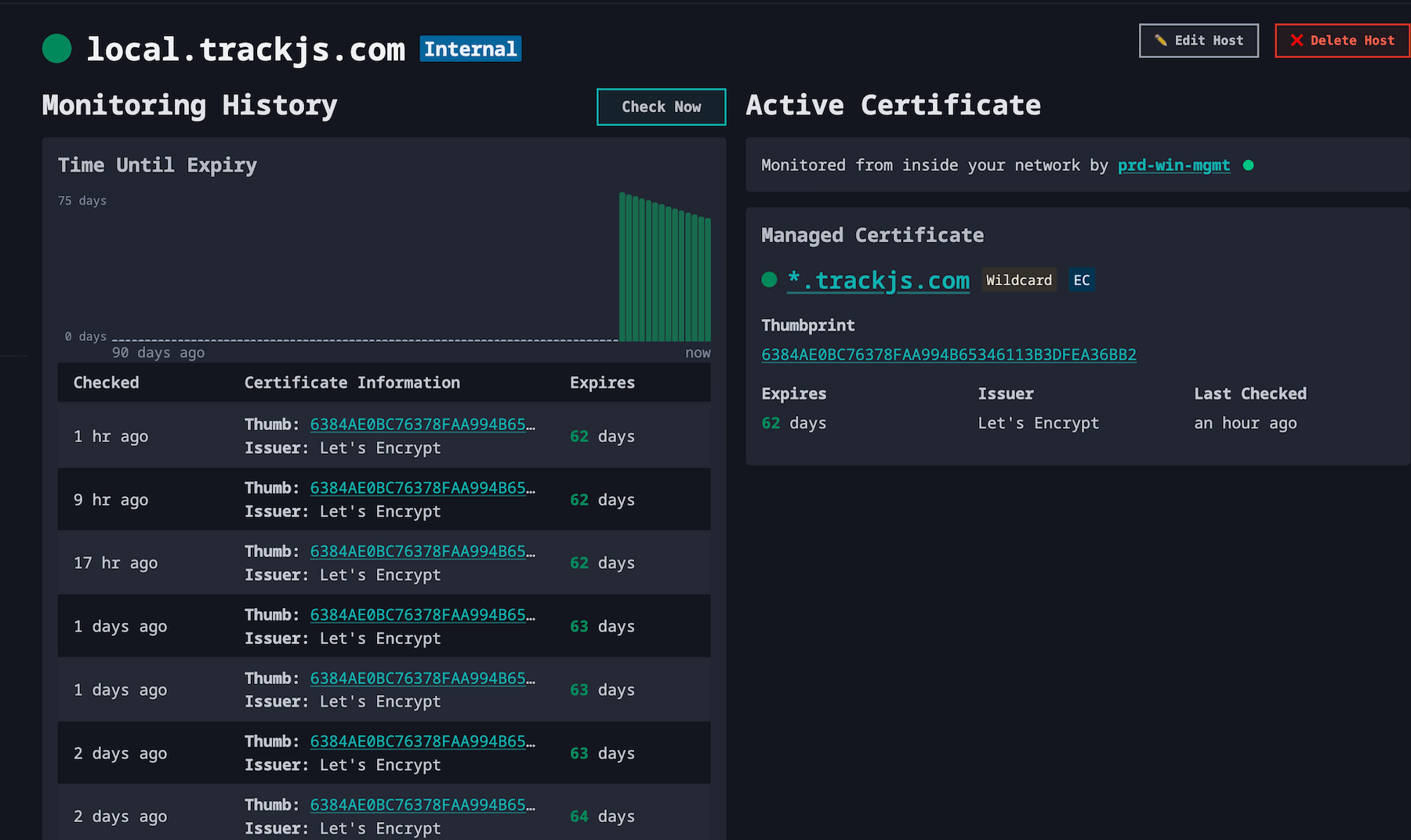
The check is a TLS handshake. The agent confirms the host is reachable, the certificate covers the hostname or IP, when it expires, and whether the chain is trusted. It only sends back public certificate metadata. Private keys never leave the host and no inbound connection from CertKit is required. Checks run every eight hours, when the host is first assigned, and whenever you hit Check Now.
Names that could never pass public validation are fine here. Internal DNS zones, single-label hostnames, RFC 1918 addresses, and split-horizon names that resolve differently inside the building all work. If you delete the agent, the host stops being checked and says so. It does not quietly fall back to cloud probing that was never going to succeed.
Trust is decided where the certificate lives
This is the part that makes Private PKI monitoring work. When an agent checks a certificate, it validates the chain against the operating system trust store, rather than a list of public roots in the cloud.
So a certificate from your private CA reads as trusted on a machine that has your root installed, and untrusted on one that doesn’t. Which is the answer you want, because that is the answer your users’ browsers will give.
That also means where you put the agent matters. An agent in a container uses the container’s network and trust store, not the Docker host’s. If you have segments with different DNS views or different trust rollouts, place an agent in each one you need to observe.
Deployment now proves itself
Deployment and monitoring used to be two separate facts about a certificate. The agent reported it deployed. The monitor reported what the host was serving. Nobody compared the two until the next eight-hour check came around, and if the deploy had silently failed, you waited up to eight hours to find out. Or until expiry, if you weren’t watching.
Now they are connected. When an agent finishes deploying a certificate, CertKit immediately queues a fresh check for every monitored host linked to that certificate. Cloud hosts are re-checked within a couple of minutes. Internal hosts get the request on the agent’s next poll. If the host is still serving the old certificate, the status changes to “Using an older version of CertKit issued certificate” right then, not at 2am when the old one expires.
Silent deploy failures are common. The script exits zero, the files land on disk, and the service never reloads. Now that shows up as a mismatch minutes after the deploy instead of as an outage weeks later.
Monitors link themselves
One more small thing. If you added a host as monitoring-only, meaning you told CertKit the certificate was managed somewhere else, and a check finds it serving a certificate CertKit issued, the host links itself to that certificate automatically. From then on it gets the deployment check above and the current-versus-stale status like any other managed host. The activity log records the change so nothing happens behind your back.
This happens a lot during rollouts. You monitor a pile of hosts first, bring them under management later, and forget to go back and update the monitors. Now you don’t have to.
Available now
Intranet host monitoring is in every account today, on trials and paid plans. It needs agent 1.13 or later, so update your agents and the Internal option appears. Get all the details at SSL Certificate monitoringge, and the docs cover agent placement, trust, and troubleshooting.
This closes one of the more requested gaps on the roadmap. If you have been keeping a spreadsheet of internal certificate expiry dates because no monitoring tool could reach them, this is the release that deletes the spreadsheet.
CertKit monitors every certificate you run, including the ones the internet can’t see.