Abstract
If you run CertKit across multiple collections, September was your month. The new home page lets you search across all of them, the new dashboard surfaces the context you need, and a read-only API pulls it all into your external tools.
Find the certificate
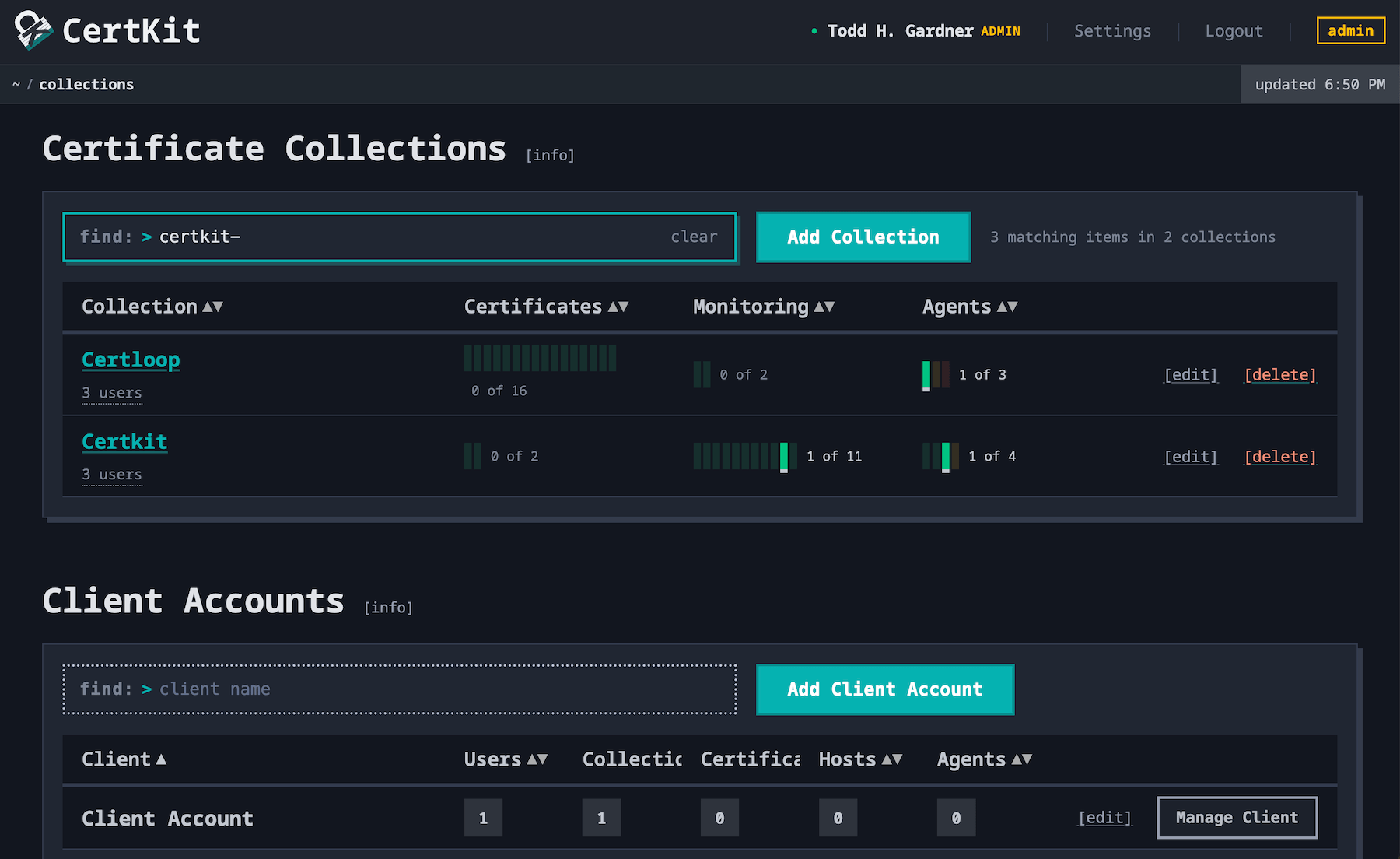
The home page is reorganized as a table of your collections, with sortable columns for certificates, monitors, and agents, and tooltips to surface important information at a glance.
The find box above the table searches everything. Type a hostname, a certificate name, an agent name, or part of a collection name, and the pips that match light up while everything else dims. Type example.com and find which collection it lives in.
The status line at the top of every page now carries the collection, and lets you switch quickly between them. If you spend your day hopping between clients, this is the change you will notice first.
See what’s important
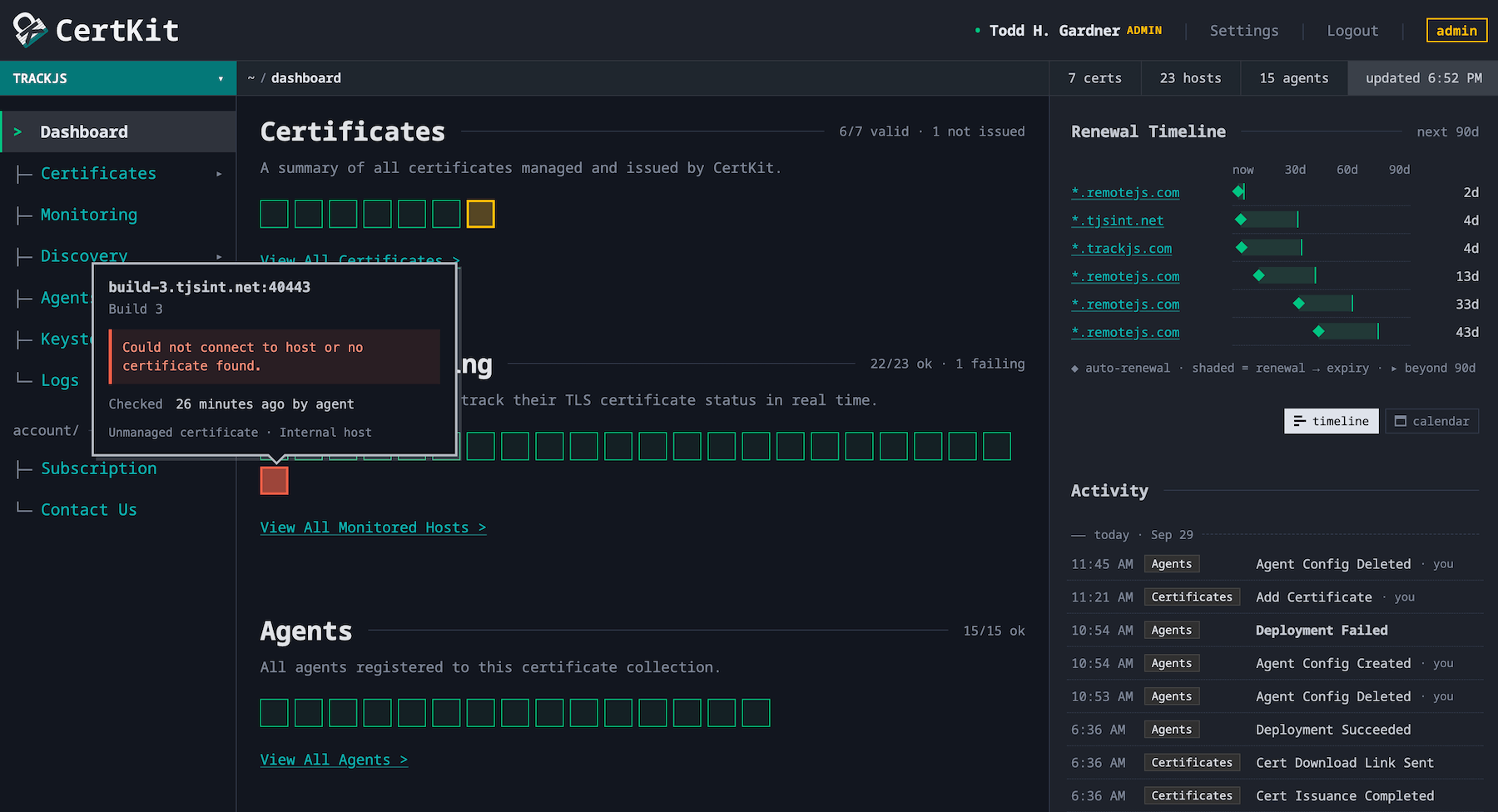
The new status line at the top tells you which collection you are in, where you are in it, how many certificates, hosts, and agents it has.
The dashboard is brand new. The main panel shows the familiar big icons representing your certificates, monitors, and agents, but polished and surfacing important information in tooltips.
The biggest change is the sidebar. The renewal timeline shows every certificate due in the next 90 days with the day CertKit will renew it, or see it as a calendar. Below it, the activity feed lists the most recent actions in the collection, who took them, and when, grouped by day, with the full log a click away.
Pull your data
Everything on those pages is also available over HTTPS as JSON. The CertKit API is read-only, takes a bearer token, and has four GET endpoints. One lists the collections in your account. The other three take a collection and return its certificates (status, thumbprints, issue and expiry dates, and the time CertKit plans to renew), its monitored hosts (the last check and the thumbprint it served), and its agents (health, every deployment config, and the output of the last failed update command when there is one). Every object carries the same Good, Ok, or Bad status as the squares. The docs have every field.
Invoke-RestMethod https://app.certkit.io/api/public/v1/collections/bfwe/certificates `
  -Headers @{ Authorization = "Bearer ck_your_api_key" } | Select-Object -ExpandProperty certificates
id                : pw08
commonName        : www.example.com
description       : Marketing site
keyAlgorithm      : EC256
sans              : {www.example.com, example.com}
issuer            : Let's Encrypt
status            : Good
statusText        : Certificate is valid and is up to date.
latestCertificate : @{thumbprint=7A3F0C4D9E21B85F6A0D3C7E5B19F2A4C8D6E0B1; sha256=2B7E151628AED2A6ABF7158809CF4F3C762E7160F38B4DA56A784D9045190CFE; issued=8/1/2026 9:02:11 AM; expires=10/30/2026 9:02:10 AM; renews=9/30/2026 9:14:38 PM}
Those are objects, not text, so adding | Where-Object status -eq "Bad" to the end of that line is the whole alert. curl with the same header works just as well, with jq in place of Where-Object.
Put it in Grafana, Power BI, or the wallboard in the NOC. One call per collection per endpoint every few minutes sits comfortably inside the rate limit, and the IDs in the responses match the IDs in dashboard URLs, so a panel can link straight to the certificate it is complaining about. Or sync it into your ITSM platform. Every certificate comes with a stable ID, both thumbprints, its expiry, and the hosts and agents it is tied to, which is everything a CMDB needs to hold it as a configuration item, and a status flip to Bad can open a ticket in ServiceNow or Jira Service Management with statusText and the agent’s message as the description.
For MSPs, it powers your invoice. One collection per client means one call to /certificates returns exactly the certificates you manage for that client and whether each one is healthy, and one call to /agents returns the servers you deploy them to. That is the line item on the monthly invoice and the health report that goes with it, from the same request. Pull it on the first of the month, drop it in the client report, and the cost of CertKit passes through to the client with numbers behind it. Keys are account-scoped, so one key covers every collection in your account. Clients with their own CertKit accounts need a key each.
Account Administrators create keys under Settings › API Settings. A key reads everything in the account and is shown exactly once, so store it in your secret manager and name one per consumer. Then a compromised Grafana key gets deleted without breaking the CMDB sync. Key creation, deletion, and last use all show up in the Activity Log.
Available now
The new home page, dashboard, and switcher are live for everyone. The API is live on Business and Enterprise plans, and in every 90-day trial. Client account management is part of our partner program for those of you that want to resell accounts to your clients.
This finishes API Read Access on the roadmap. Have a look at our plan and leave a vote for what you’d like us to build next.
CertKit automates certificate lifecycle management for every client you manage, from one login.