Abstract
A couple days ago, I told you how a spammer got a certificate for dev-docs.trackjs.com, and that we only found out because Google emailed us.
Google knew because the spammer claimed the hostname in Search Console. An attacker running a phishing page wouldn’t have done that, but they would still need a certificate. Every publicly trusted certificate gets written to a public log, and we track that log in our database. We just weren’t watching it.
Now we are, and you can too.
Watch a domain, get an email
Open Discovery Alerting in CertKit and add your domains to watch. You can watch any registrable domain, like example.com, and that covers every subdomain under it. You can also search the CT log for a domain and hit “Add alerts” right from the results.
CertKit suggests the domains already on your certificates and monitored hosts, but it doesn’t have to be a domain CertKit manages. Add the marketing domain your agency uses, or the domain from the acquisition nobody finished migrating.
There are two emails, and each person on your team chooses which ones they get.
The new certificate alert goes out when a certificate shows up with a set of names CertKit has never seen for your domain. We check every few hours. Renewals don’t trigger it, and neither do the certificates that already existed when you started watching. When this email arrives, something is new. Either someone on your team stood up a new host, or someone who isn’t on your team did.
The weekly summary arrives every Thursday morning with every certificate issued for your watched domains in the last seven days. Here is ours for certloop.dev, a domain we use for testing.
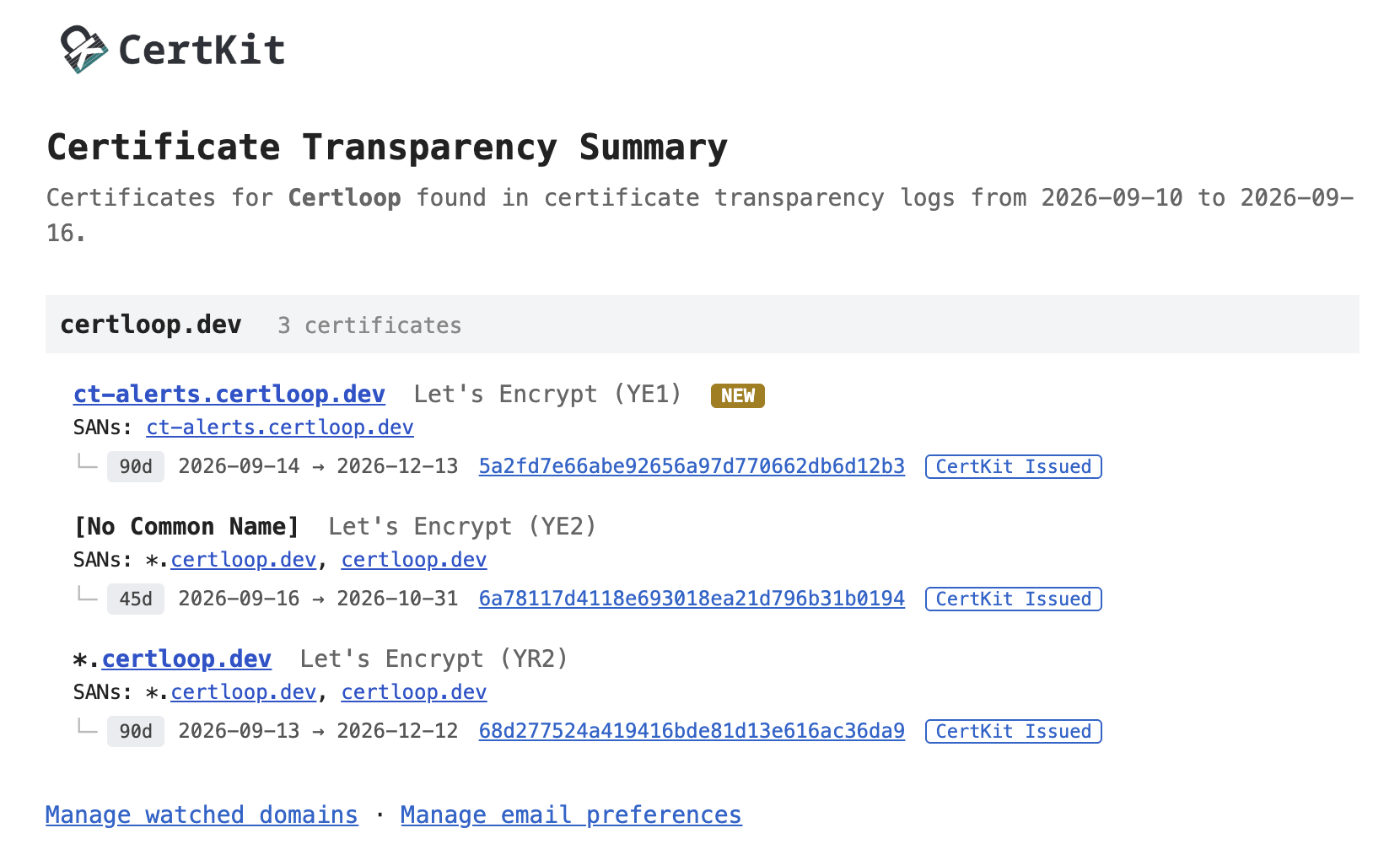
Three things happened on certloop.dev that week. The first is tagged NEW, which means no certificate for ct-alerts.certloop.dev existed before this week. That was us, testing this feature. The other two are renewals of wildcards we have had for a while. The one with no common name comes from Let’s Encrypt’s tlsserver profile, which drops the common name and issues 45-day certificates.
Every certificate in that email carries a CertKit Issued badge, because CertKit issued all three. That badge is the fastest way to read the summary. A certificate without it came from somewhere else. Maybe a platform that issues on your behalf, maybe a coworker with Certbot, maybe a stranger.
If you get a NEW you don’t recognize, look up where the name points in DNS and find out who controls that address. If the answer is “not us”, delete the record and read that post for the rest.
CT log search, grouped by lineage
The same grouping is now in the CT log search inside the app.
A search for trackjs.com returns 71 certificates, which sounds like a lot to keep track of. It is really just 12 lineages. Every renewal issues a brand new certificate and the log keeps all of them, so most of those 71 are older versions of the same thing. Search results now roll up certificates that share a common name, a set of names, and an issuer into one row. That row is the certificate lineage, the thing you mean when you say “the certificate for api.trackjs.com.” Expand it to see every certificate in the lineage and when each one expires.
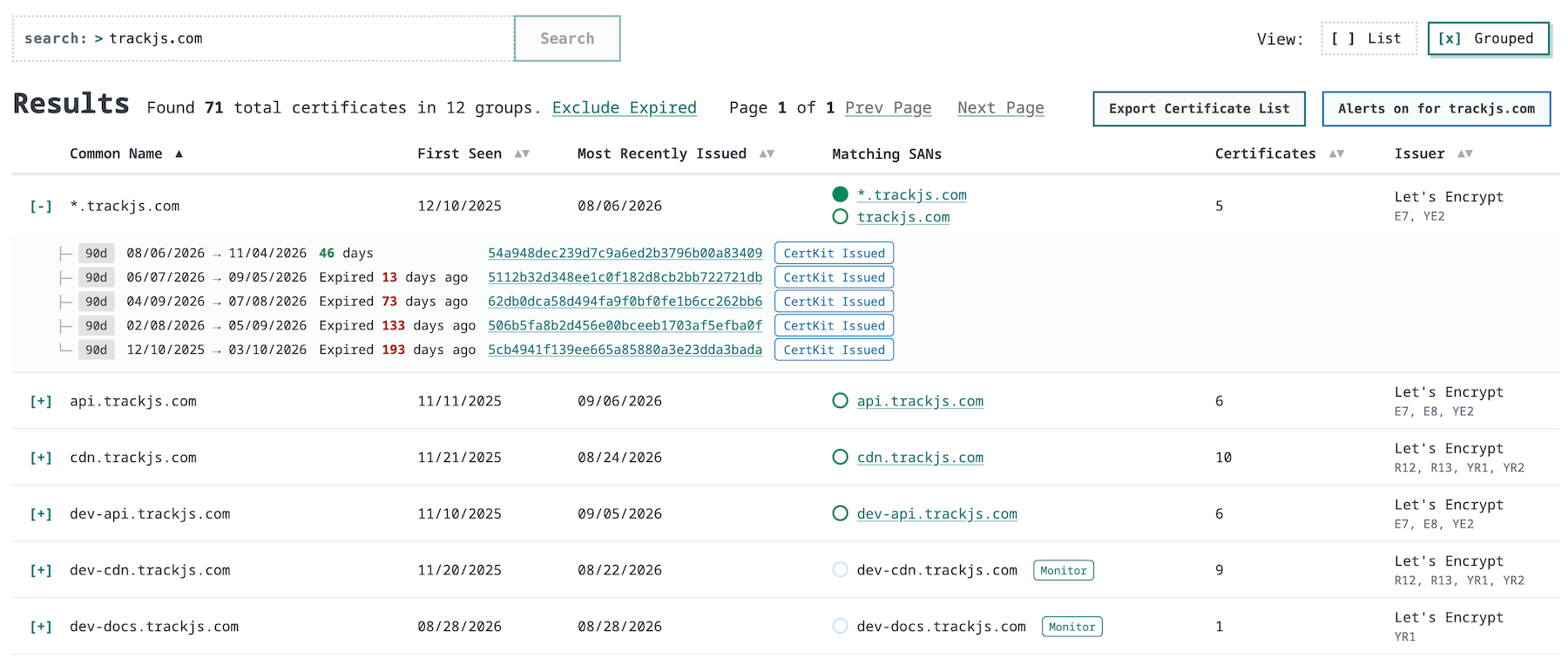
Look at the last row. Every lineage above it has five to ten certificates and a first-seen date from last year. dev-docs.trackjs.com has one, first seen on 08/28/2026, and that’s the spammer’s.
Any host you aren’t monitoring yet gets a Monitor button, which puts it under certificate monitoring in one click.
Available now
CT alerts and grouped search are live on Business and Enterprise plans, and in every 90-day trial. This finishes Certificate Transparency Log Monitoring on the roadmap.
CertKit watches the certificate transparency logs for your domains, so a certificate you didn’t ask for lands in your inbox before it lands in an incident.