Abstract
In May I wrote that you probably don’t need private PKI for internal infrastructure, because DNS validation gets a publicly trusted certificate onto hosts that never touch the internet. In June I pointed out that Apple enforces an 825-day cap on private certificates, so your own CA doesn’t even free you from the browser vendors. Two days ago I told you that public client certificates stop renewing in October, and that the replacement is a private certificate authority.
Today CertKit ships Private PKI. I meant every word.
The argument was never that private certificates are useless. It was that running a certificate authority is a job, and most teams shouldn’t take that job. It’s difficult, time consuming, and easy to get wrong. So we took it instead.
Minting a root is the easy part
Anyone can create a certificate authority. openssl will do it in five minutes, and Stack Overflow will hand you the command.
Then the job starts. You have to protect the root key for a decade. You have to publish a revocation list and keep publishing it, because the day you stop, every certificate you ever issued becomes unrevocable. You have to rotate the issuing CA before it expires without breaking everything that chains to it. And you have to get the root into the trust store of every server, workstation, contractor laptop, and vendor appliance that will ever see one of your certificates. Miss one and it throws warnings, and your users learn to click through certificate warnings. That is the failure mode, when you may as well have used self-signed and saved yourself the hassle.
Distribution is the part nobody solves, and distribution is what kills most private PKI projects.
When you need a private certificate authority
For most internal servers, my advice hasn’t changed. A public certificate through DNS validation is simpler, and it skips the entire job above.
But there is a real list of places a public certificate can’t follow you, most notably client authentication. mTLS needs certificates with the clientAuth extension, and after October there is no public renewal path for those. IP addresses and internal names are next. RFC 1918 addresses, single-label hostnames, and private zones like db01.corp.internal can never pass public validation.
Lifetime matters too. Public certificates are at 200 days and headed to 47, while a private server certificate can run 825 days. And every public certificate is published to Certificate Transparency logs, where anyone can enumerate it. If your security posture says internal topology stays internal, public issuance was never an option.
How CertKit Private PKI works
You create a CA from a form, the same way you would request a certificate.
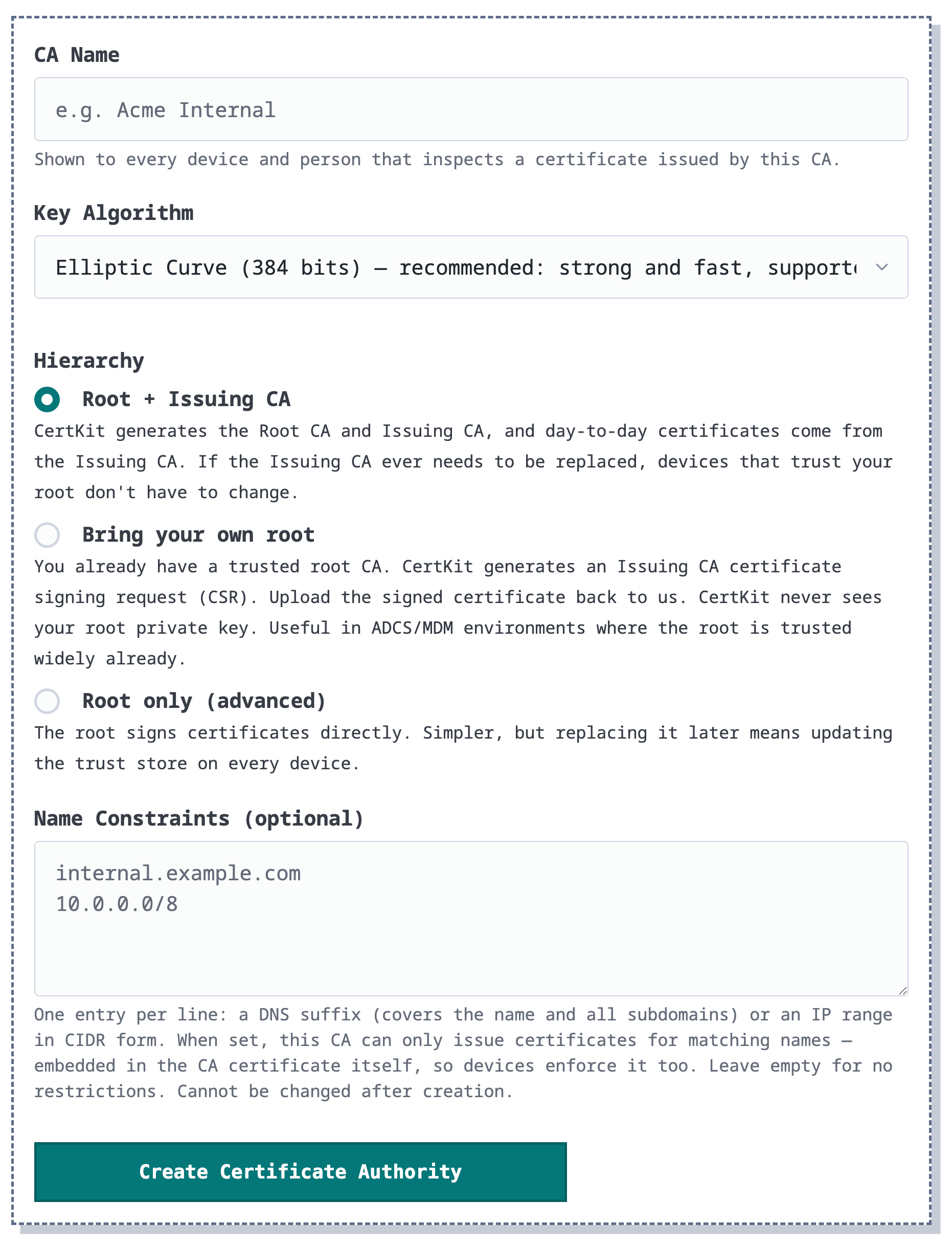
By default CertKit builds a two-tier hierarchy: a root CA valid for ten years and an issuing CA valid for five. Certificates chain to the issuing CA, so it can rotate without touching a single trust store, and CertKit rotates it automatically when around two and a half years remain. If your organization already has a trusted root, like from ADCS, you can bring your own. CertKit generates a subordinate CA, your root signs it, and certificates chain to a root your devices already trust. No trust rollout at all.
Keys default to EC 384, with RSA available when compatibility demands it. Name constraints are optional, and you should use them. Constrain the CA to your DNS namespace and IP ranges, and it cannot issue for anything else, no matter what goes wrong upstream.
Issuance works like every other CertKit certificate. Same form, same renewal engine, same agents deploying to Windows, Linux, and appliances. SANs can hold internal names, wildcards, and IP addresses. Key usage is selectable: server authentication, client authentication for mTLS, or both, which is exactly the combination the public CAs just stopped selling. Lifetimes run 90, 365, 730, or 825 days, with no validation dance, no rate limits, and no CT log entry. Revocation is real. Each CA publishes a CRL at a stable URL, and retired issuing CAs keep serving their lists until the last certificate they signed expires.
Why 825? That is the ceiling Safari enforces on every TLS server certificate, no matter who issued it. Apple doesn’t care who signed your certificate.
The root installs itself
This is the part I care about most. When an agent deploys a certificate from a private CA, it also installs the root into that host’s trust store. Windows gets it in the Local Machine Trusted Root store, Debian and Ubuntu through update-ca-certificates, RHEL and friends through update-ca-trust. The certificate shows up already trusted. No warnings, no exception dialogs, no help desk ticket.
The CA page shows trust status for every host, so you can see where the root is installed instead of keeping a spreadsheet. If policy says roots only arrive by GPO or MDM, turn auto-install off and the agent reports status without touching the store. The root also lives at a stable public URL for your config management to pull.
Available now
Private PKI is available in your account today for trials and Business accounts. You can create up to five CAs per account. The managed PKI product page covers how it fits together, and the docs cover the details, including trust distribution, revocation, name constraints, and bring your own root.
This was one of the largest items on the roadmap. If you have been holding a pile of internal certificates together with openssl and a wiki page, this is the release that retires both.
CertKit handles the entire certificate lifecycle, public and private, so running your own CA is not your job.