Abstract
Starting Tuesday, October 27, a lot of university websites will open in Chrome to this.
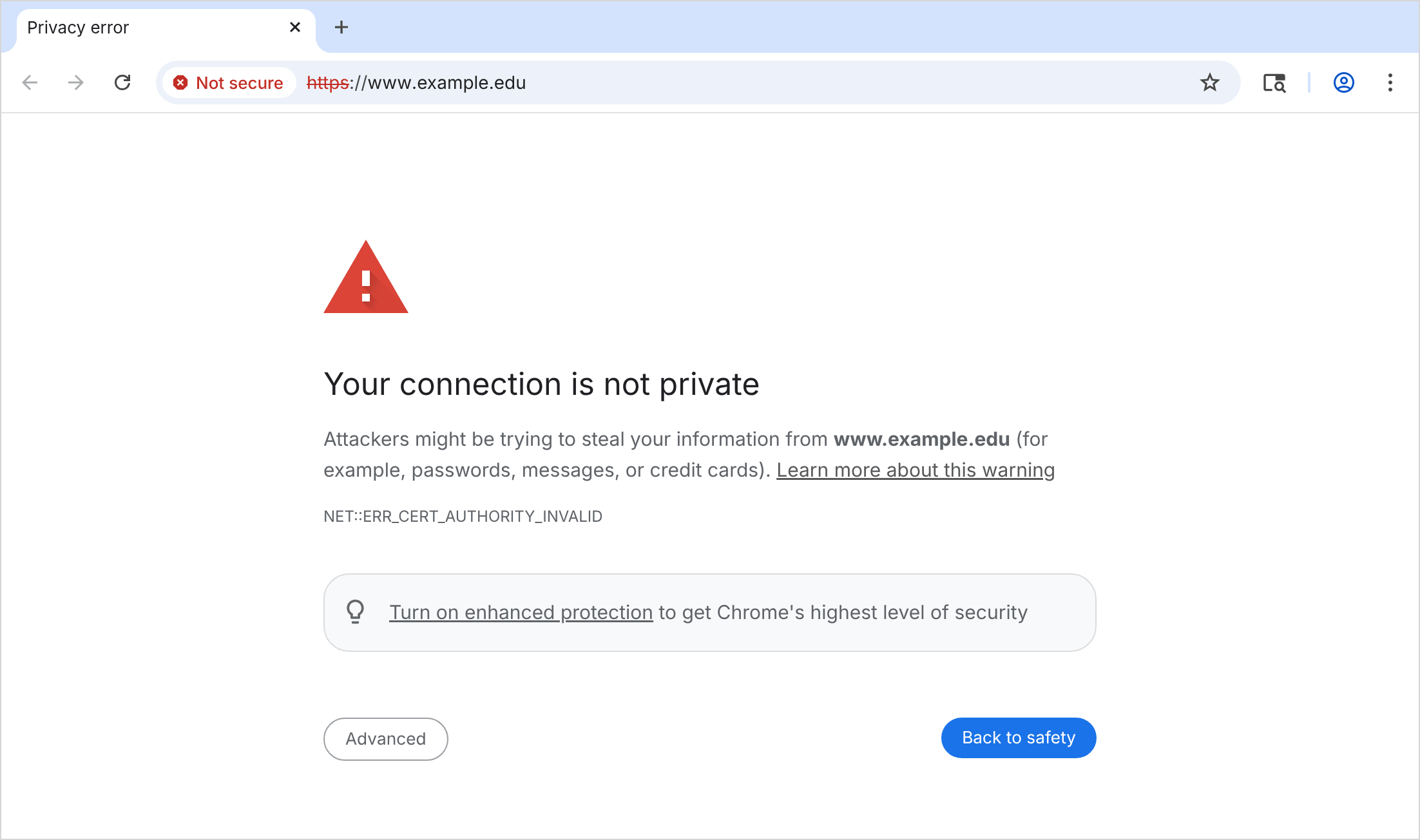
Chrome is distrusting a root certificate, emSign ECC Root CA - G3, after eMudhra generated CA keys as small as 4. Every InCommon certificate issued from eMudhra’s ECC chain since April chains to that root. Chrome counted about 30,800 unexpired certificates under it, almost all InCommon’s, and on the morning of October 23 our CT log search still showed 3,481 current ones at 41 of the 57 large universities we track.
The fix is moving each certificate to a different CA and deploying it everywhere it’s used. The same error has a handful of other causes too, and the fix for each is different.
What NET::ERR_CERT_AUTHORITY_INVALID means
Chrome checks a certificate by building a chain from it, through one or more intermediates, to a root it already trusts. Those roots are the Chrome Root Store plus anything an administrator or user installed on that computer. When no chain ends in a trusted root, Chrome shows NET::ERR_CERT_AUTHORITY_INVALID. Chromium’s list of network errors gives three explanations, including an attacker whose certificate is “signed by their cousin”.
Edge and other browsers built on Chromium show the same code. Firefox calls it SEC_ERROR_UNKNOWN_ISSUER.
First, find out whether it’s the site or the computer. If one site fails on every machine, it’s the site. If every HTTPS site fails on one machine, it’s that machine, and no server change will fix it. Our certificate chain checker tests a site from outside your network and shows the chain it found.
Why InCommon certificates fail in Chrome on October 27
Chrome Root Store version 43 drops emSign ECC Root CA - G3. Google expects to release it “for all devices” on Tuesday morning, October 27, Pacific time, so most machines start failing Tuesday or Wednesday.
That means Chrome on Windows, macOS, Linux, ChromeOS, and Android. Chrome on an iPhone or iPad uses Apple’s certificate checks, Edge on Windows and macOS uses Microsoft’s root list, and Safari uses Apple’s. As of October 22, Apple and Microsoft still trusted the root. A site that loads in Edge and fails in Chrome on the same computer is almost certainly this.
How to tell if your certificate is affected
Use our certificate chain checker for your host, and check the issuer at the bottom of the chain. If it ends in G3C (InCommon Intermediate CA - OVG3C, DVG3C, or EVG3C), it fails in Chrome starting Tuesday. Those chain through emSign Root TLS CA - G3 to the removed root.
InCommon’s RSA intermediates (OVG2C, DVG2C, EVG2C, and InCommon RSA IGTF Server CA 4) chain to eMudhra’s other root, emSign Root CA - G1, and keep working, for now. Certificates from InCommon’s Sectigo years, like InCommon RSA Server CA 2, aren’t affected at all.
Don’t stay on eMudhra’s RSA root, and don’t add the old root back
InCommon’s advice to subscribers is “Reissue affected certificates as [eMudhra] RSA until ECC issuance is restored to avoid disruption.” Cornell’s IT alert says RSA certificates “use eMudhra’s unaffected root and should work.” Schools listened. Of about 2,000 certificates we saw replaced on October 21 and 22, 97% went to eMudhra’s RSA chain. All 164 replaced overnight into October 23 went there too.
InCommon’s FAQ now goes further. It says ECC issuance is back, through that same RSA root, and that existing ACME clients can renew without changes. It says certificates already issued “remain trusted until they expire,” this week’s reissues included, and that no further action is currently required.
InCommon can’t promise that, and you shouldn’t listen. Whether emSign Root CA - G1 stays trusted is up to Google, Mozilla, Apple, and Microsoft, and Google says it’s “closely investigating the ongoing inclusion of eMudhra’s remaining CA certificates.” A researcher found that an October 14 revocation list for the RSA hierarchy was signed with the wrong key, one meant for OCSP responses. Chrome asked eMudhra to explain it and hasn’t gotten an answer. eMudhra’s only comment since October 20 says social media scrutiny has made analysis “pretty much impossible.”
eMudhra is also getting forced out quitting TLS certs. It announced on October 22 that it’s exiting the TLS certificate business, and InCommon says eMudhra will stop issuing from any intermediate chained to its public roots in about 30 days. InCommon hasn’t said which root comes next or whether ACME clients will need changes, and it says each primary organization administrator will likely need to be revalidated by phone.
I expect the RSA root to be distrusted too. If it is, every certificate on it fails the way G3C certificates fail this week, however long it had left. If it isn’t, your next certificate from CertiNext comes from a root nobody has named yet, on a schedule set by eMudhra and InCommon. Move once, to a CA that isn’t leaving. Michigan’s security office got this right on October 20. It lists Let’s Encrypt first and warns that an RSA certificate from eMudhra “may not be permanent.”
The other (really bad idea) shortcut is putting the distrusted root back manually. Chrome trusts roots that an administrator installs, so pushing emSign ECC Root CA - G3 to managed computers through Group Policy or an MDM makes the warning go away on those computers. Don’t do that. It does nothing for visitors, students on their own laptops, or anyone’s phone. It also puts trust back in a root that Mozilla removed and Google is removing, because the private keys of eight intermediates under it are public.
Move each certificate to another CA
Any CA in Chrome’s root store works. Let’s Encrypt is free and is what Michigan lists first. Google Trust Services is also free over ACME, once you create an account key in Google Cloud. Sectigo and DigiCert sell certificates over ACME if you like giving people money.
Check your CAA records first
A CAA record in DNS lists the CAs allowed to issue for a domain. Every CA has to check it, at the name being issued and then at each parent domain up the tree, and use the first set of records it finds. If that set doesn’t name your new CA, the order fails.
dig +short CAA example.edu
Run it for the name on the certificate and each parent, and look at both kinds of records. issue covers normal certificates. issuewild covers wildcards and overrides issue when it’s present. We checked the 57 universities we track. Eight have CAA records at the top of their domain that limit which CAs can issue, and none limits it to emsign.com alone. But Boston University, Emory, NC State, and Nebraska all have issuewild lists without Let’s Encrypt, so a Let’s Encrypt wildcard fails there until someone adds it. Departments that run their own DNS zones can have their own CAA records too.
Add the new CA’s value next to whatever you already allow.
| CA | CAA value |
|---|---|
| Let’s Encrypt | letsencrypt.org |
| Google Trust Services | pki.goog |
| Sectigo | sectigo.com |
| DigiCert | digicert.com |
| eMudhra | emsign.com |
Point your ACME client at the new CA
The new CA also has to be able to validate your domains. InCommon’s ACME service issues for domains your institution already validated, so some campus setups never answer a challenge. Michigan’s guide runs Certbot in manual mode with /usr/bin/true as the hook. Let’s Encrypt and Google make your ACME account prove control of every name, so the server needs working HTTP-01 or DNS-01 validation.
Automatic renewal won’t do any of this for you. Your ACME client renews when the certificate gets close to expiring, or when the CA tells it to, and either way it goes back to the same CA. You have to reconfigure your clients and force a renewal by hand.
certbot renew --cert-name www.example.edu \
  --server https://acme-v02.api.letsencrypt.org/directory \
  --force-renewal
Without --force-renewal, Certbot says the certificate isn’t due and does nothing. If your setup skipped validation, use certbot certonly with an authenticator that answers the challenge, like --webroot or a DNS plugin, and repeat your hooks on that command, because certonly rebuilds the renewal config from its own command line.
Let’s Encrypt allows 50 new certificates per registered domain a week, and Minnesota has 634 to move, so a big school has to split them across CAs.
Wildcards help too, since each one counts as one certificate, and wildcards are okay and very common. A wildcard covers one level, so *.umn.edu would replace only 12 of Minnesota’s 634, while *.cselabs.umn.edu alone covers 213. Let’s Encrypt issues wildcards only with DNS-01 validation.
Check what certificates you have
To find hosts you forgot about, search your domain in our CT log search. It lists every certificate issued for your names. The issuer column shows the issuing organization, which is Internet2 for every certificate eMudhra issued for InCommon, so open one to see its full issuer name.
A new certificate in CT logs means somebody ordered it. It doesn’t mean any server is using it. Run each host through the chain checker again after you deploy. The chain should end at your new CA’s root, and “Root is not trusted” should be gone.
Two mistakes show up a lot in a rushed migration. The first is installing the new certificate with the old chain file, so the server sends a Let’s Encrypt certificate followed by InCommon’s G3C intermediate. Chrome usually fetches the right intermediate on its own. curl and Python fail with unable to get local issuer certificate, and Java with PKIX path building failed. The second is fixing the web server and forgetting the load balancer, CDN, or appliance in front of it that holds its own copy.
Other causes of NET::ERR_CERT_AUTHORITY_INVALID
These were the usual reasons before October 27. We reproduced each one in Chromium.
A root Chrome removed. eMudhra isn’t the first. Chrome stopped trusting new certificates from Entrust’s roots in November 2024, and Symantec’s before that. The fix is a certificate from a CA still in the store.
A self-signed certificate. Appliance admin pages, development servers, and new devices ship with one. A server also falls back to its default certificate, often self-signed, when a request names a site it isn’t configured for. The fix is a certificate from a trusted CA on that name. For a development machine, a local CA that the developer’s computer trusts does the job.
A private CA’s root isn’t on this computer. Certificates from an internal CA, like Active Directory Certificate Services, work only on machines where its root was installed. Managed laptops get it from Group Policy or MDM. Personal devices, Linux boxes, and phones don’t. Deploy the root to the machines you manage, and use a public certificate for anything other devices reach. Most internal services don’t need a private CA to begin with.
TLS inspection or antivirus. If every HTTPS site fails on one machine or one network, something is decrypting and re-signing traffic: a corporate proxy, a firewall’s inspection feature, or antivirus web scanning. Click “Not secure” and look at the certificate. The issuer will be that product. Either IT installs that product’s root on the machine, or the inspection gets turned off for it.
A missing intermediate Chrome can’t fetch. When a server leaves out an intermediate, Chrome downloads it from the address in the certificate’s Authority Information Access (AIA) field. Chrome also fails when a firewall blocks that download, which happens on locked-down networks. The fix is to send the full chain.
SEC_ERROR_UNKNOWN_ISSUER in Firefox
Firefox shows “Warning: Potential Security Risk Ahead” with SEC_ERROR_UNKNOWN_ISSUER for the same failure, and MOZILLA_PKIX_ERROR_SELF_SIGNED_CERT for a self-signed certificate. Firefox keeps its own root list on every platform. On Windows, macOS, and Android it also uses roots added to the operating system. It doesn’t download missing intermediates the way Chrome does, but it ships a list of known ones, so a missing public intermediate usually works.
For InCommon’s G3C certificates, Firefox is about two weeks behind Chrome. As of October 22, Firefox 159 still trusted emSign ECC Root CA - G3, and Firefox 160, due November 10, was the first release with Mozilla’s root list without it.
The next time your CA changes
InCommon schools are switching CAs for the second time this year. With per-server ACME, the CA is set in every server’s config, so each switch means logging into every server.
In CertKit, the issuer is a setting on each certificate. The next CA change is a change in one place, and CertKit deploys the new certificate everywhere the old one went. CAA still has to allow the new CA. For an emergency like this one, ask us to move them for you. Our staff can bulk migrate your certificates across several CAs at once, so no single CA’s rate limit holds you up.
CertKit automates certificate lifecycle management so the next CA change is a setting, not a week of logins.