Abstract
Your site loads in Chrome fine. Then a deploy script, a webhook, or integration calls the same URL and gets this:
curl: (60) SSL certificate problem: unable to get local issuer certificate
Python says certificate verify failed: unable to get local issuer certificate. Node says unable to get local issuer certificate, or unable to verify the first certificate. It’s all the same problem.
It’s a misconfiguration between your certificate and a trusted root. Either the server isn’t sending it, or the client doesn’t have it. There are about a dozen ways to end up there, and the fix depends on which one you hit.
What “unable to get local issuer certificate” means
A client checks a certificate by walking up the chain. Each certificate names its issuer, and the client has to find that issuer, either in what the server sent or in its own list of trusted roots. “Local issuer” means the trust store on the client. The error says the client looked at everything the server sent, and locally, and couldn’t find anything.
That means either the server didn’t send a certificate it should have, or the client’s trust store is missing a root, like maybe one that got distrusted for poor security practices. In Chrome, a missing root shows up as NET::ERR_CERT_AUTHORITY_INVALID. The fixes are different, so find out which one you have before you change anything.
OpenSSL and Node split the server-side case into two codes. When the server doesn’t send any intermediates, you get error 21, unable to verify the first certificate (Node calls it UNABLE_TO_VERIFY_LEAF_SIGNATURE). When the server sends some intermediates but not enough, you get error 20, unable to get local issuer certificate (UNABLE_TO_GET_ISSUER_CERT_LOCALLY). curl and Python report error 20 for both.
Browsers kindly ignore a missing intermediate, which is why the site looks fine to you. Chrome and Safari download it from the address printed in the certificate they did get, a field called Authority Information Access (AIA). Firefox ships a list of known intermediates, and Windows fetches them for anything that uses its own chain engine. Linux, curl, Python, Java, Android, Go, and most embedded devices are much more strict.
Find out whether it’s the server or your machine
Run the hostname through our certificate chain checker. It connects from our servers, records exactly which certificates your server sends, and builds the chain against the Mozilla root list that most Linux tools use. Every certificate gets a label for where it came from. It was sent by the server, fetched from AIA, or found in the trust store.
Here’s what it shows for a test host that sends its own certificate and nothing else.
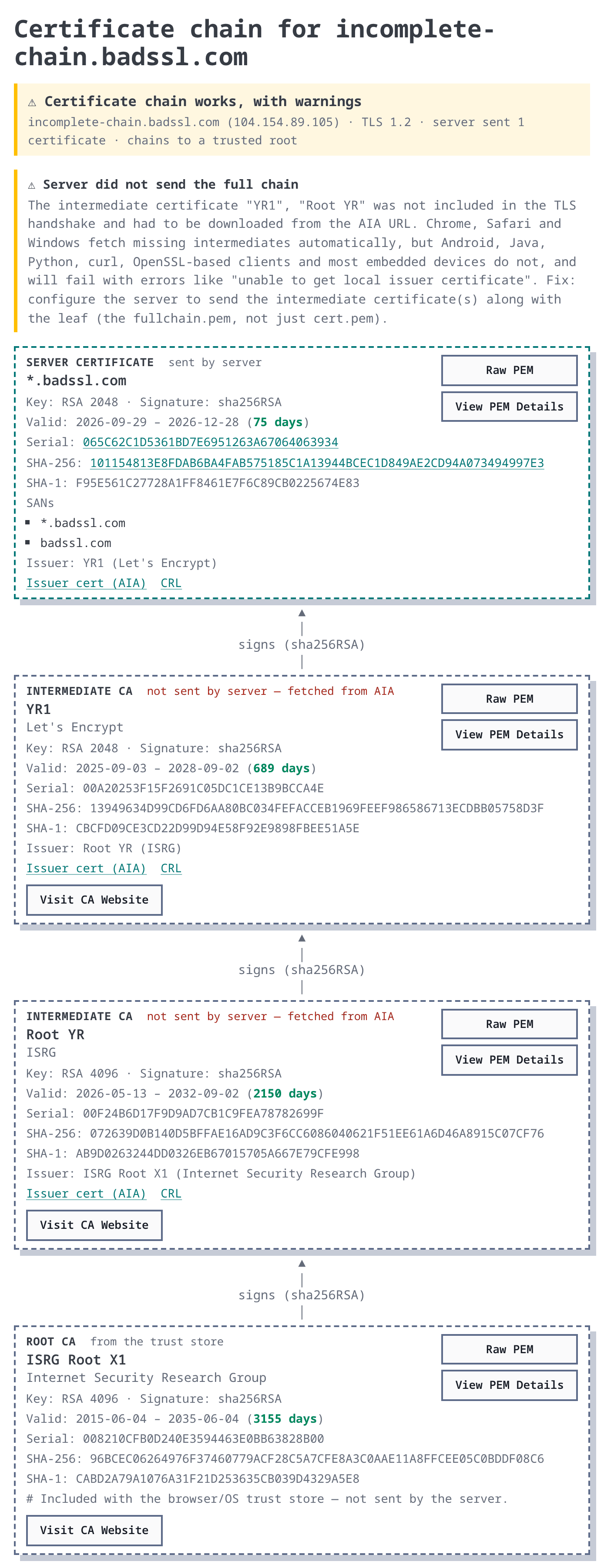
Anything fetched from AIA is a certificate your server should be sending and isn’t. That’s a server fix.
If the checker finds nothing wrong and your machine still fails, then you’re the problem. Run openssl from the machine that fails and read the issuer (i:) line of the last certificate it prints.
openssl s_client -connect example.com:443 -servername example.com -showcerts </dev/null
The chain checker only reaches public hosts. For a server inside your network, the openssl command is the check, run from a machine that can reach it.
Why a server sends an incomplete certificate chain
There are a few different ways this can happen.
It was configured with the certificate alone. This is the easy mistake to make. Your CA hands you the certificate and the intermediates as separate files or as a bundle, and the server only got the first. CAs send you cert.pem, chain.pem, fullchain.pem, and privkey.pem. cert.pem is the wrong one to hand a web server.
The CA changed its chain and the server kept the old one. A chain file somebody downloaded once and pastes onto every renewal only works until the CA changes intermediates, every 4 years or so. Three of the largest CAs have changed theirs since 2025. DigiCert’s default TLS issuance moved to its G5 root on October 15, 2026, and it plans to rotate its intermediates every year starting in 2027. Sectigo moved issuance to new R46 and E46 roots, reached through cross-signs from its older USERTrust roots. Let’s Encrypt moved its default profile to a new Generation Y hierarchy at the end of May. Much of it traces to Chrome’s root program, which retires old roots on a 15-year schedule, wants TLS certificates on hierarchies that do nothing else, and will cap each CA at two roots in 2027.
The new chain is longer. A new root isn’t in old trust stores, so CAs bridge to it with a cross-signed certificate from the old root, and the server has to send that too. Let’s Encrypt’s default RSA chain went from one intermediate to two.
your certificate
  └─ YR1 or YR2
       └─ Root YR, cross-signed by ISRG Root X1
            └─ ISRG Root X1, already in the trust store
That middle certificate is named Root YR, but in this chain it does an intermediate’s job. Root YR isn’t in the major trust stores yet, so a server that sends YR1 and stops there fails every client that doesn’t go fetching.
The intermediate was hardcoded. CAs rotate intermediates, and some do it on purpose so nobody pins one. Let’s Encrypt picks one at random on every issuance, so a hardcoded YR1 file works until the first renewal that draws YR2.
The device has one field for it. Plenty of appliances and admin consoles offer a single “CA certificate” box. Paste in a two-certificate chain and they keep the first, or reject it, or accept it and serve something else. Their manuals rarely say which.
Windows built the chain itself. IIS doesn’t serve a chain file. Windows assembles the chain from the machine’s certificate stores and serves the path it trusts, so an intermediate that never made it into the Intermediate Certification Authorities store may never be sent. If the server trusts a root its clients don’t, such as a newer root that hasn’t reached client trust stores, Windows can serve the short path to that root, and there’s no IIS setting that changes it.
Something else terminates TLS. A load balancer, CDN, or reverse proxy in front of the server presents its own copy of the certificate. You fixed the web server, and the box that clients talk to still has the certificate that was uploaded without its chain.
Fixing the chain on the server
The server has to send your certificate plus every intermediate up to a root the client already trusts. Your CA hands you that as a bundle. Use the bundle.
In nginx, point ssl_certificate at the full chain.
ssl_certificate     /etc/letsencrypt/live/example.com/fullchain.pem;
ssl_certificate_key /etc/letsencrypt/live/example.com/privkey.pem;
Apache 2.4.8 and later read the chain from the same file. Older versions use SSLCertificateChainFile pointed at chain.pem.
SSLCertificateFile    /etc/letsencrypt/live/example.com/fullchain.pem
SSLCertificateKeyFile /etc/letsencrypt/live/example.com/privkey.pem
On IIS and other Windows services, import the PFX with its chain so the intermediates land in the computer’s Intermediate Certification Authorities store. Then open certlm.msc and check Trusted Root Certification Authorities for any root your clients won’t have.
On an appliance or a load balancer, import every certificate in the bundle, not just the first. Then check what it serves, because the import screen won’t tell you.
Run the chain checker again, or openssl. A correct chain shows every certificate up to one whose issuer is in the trust store. Here’s ours.
$ openssl s_client -connect www.certkit.io:443 -showcerts </dev/null
 0 s:CN = www.certkit.io
   i:C = US, O = Let's Encrypt, CN = YR2
 1 s:C = US, O = Let's Encrypt, CN = YR2
   i:C = US, O = ISRG, CN = Root YR
 2 s:C = US, O = ISRG, CN = Root YR
   i:C = US, O = Internet Security Research Group, CN = ISRG Root X1
Verify return code: 0 (ok)
CertKit does this for you. It deploys the full chain the CA issued on every renewal, in the format each target takes, whether that’s nginx, Apache, Windows, or an appliance like FortiGate, Palo Alto, or NetScaler.
Fixing “SSL certificate problem: unable to get local issuer certificate” on your machine
When the server checks out, the client is missing a root. That happens for a handful of reasons.
You’re behind a TLS inspection proxy. If the issuer on the last certificate from openssl is your own company, or Zscaler, Netskope, or your firewall vendor, something on the network decrypts your traffic and signs it again with a private root. IT pushed that root to your operating system, so your browser trusts it. Your command-line tools often don’t.
The tool brings its own trust store. Node from nodejs.org, Python’s requests, and many Java installs keep their own list of roots and don’t read the one your operating system uses. A root that IT installed on the machine never reaches them.
The trust store is old. An old operating system, a container image that hasn’t been rebuilt in years, or an embedded device can be missing a newer root. Cross-signs exist for exactly these clients, so this often shows up together with a server that isn’t sending its cross-sign.
The certificate comes from a private CA. Internal services often use certificates from a company CA. Every client that talks to them needs that CA’s root installed, and the one that fails is the one that missed the rollout.
It’s Python on a Mac. Python installed from python.org doesn’t use the macOS keychain, and it has no CA bundle until you run Install Certificates.command from its folder in Applications.
Here’s where each tool looks and how to add a root.
| Tool | What it prints | Where it looks for roots | Fix |
|---|---|---|---|
| curl | SSL certificate problem: unable to get local issuer certificate |
Its CA bundle (the system’s on Linux) | --cacert ca.pem or CURL_CA_BUNDLE=ca.pem |
| git | SSL certificate problem: unable to get local issuer certificate, or server certificate verification failed on Debian and Ubuntu |
Its CA bundle, set by http.sslCAInfo |
git config --global http.sslCAInfo ca.pem. On Windows, git config --global http.sslBackend schannel uses the Windows store instead |
| Python requests | certificate verify failed: unable to get local issuer certificate |
certifi’s bundle, not the system’s | REQUESTS_CA_BUNDLE=ca.pem |
| pip | certificate verify failed: unable to get local issuer certificate |
The system store plus certifi, from pip 24.2 on Python 3.10+ | Upgrade pip, or pip install --cert ca.pem |
| Node.js and npm | unable to get local issuer certificate |
Node’s built-in Mozilla list | NODE_EXTRA_CA_CERTS=ca.pem, or NODE_USE_SYSTEM_CA=1 on Node 22.19+ and 24.6+ |
| Postman | unable to get local issuer certificate |
Not documented | Settings, App settings, Certificates tab, CA certificates |
The curl, git, and Python requests fixes replace the tool’s default list instead of adding to it. Make ca.pem the normal bundle with your root appended, or every site that skips the proxy starts failing.
What you shouldn’t do is turn verification off. git config http.sslVerify false, NODE_TLS_REJECT_UNAUTHORIZED=0, verify=False, and curl -k all make the error go away by no longer checking who is on the other end of the connection.
It comes back every renewal
A server-side chain problem is a deployment problem, and every renewal is a new deployment. CAs rotate intermediates, root programs retire roots, and certificate lifetimes are shrinking to 47 days by 2029, about twelve renewals a year for every certificate you run. A good result from the chain checker covers one renewal.
CertKit can’t change how Windows builds a chain, but it does take the full chain the CA issued and deliver all of it on every renewal, in whatever format the target needs. That might be PEM with intermediates, a PFX, a Java keystore, or an appliance’s import API. Then SSL certificate monitoring checks every public host from the outside every 8 hours, the same way curl sees it, and the host’s Chain badge reads “Missing Intermediate” if a certificate stopped going out.
CertKit automates certificate lifecycle management so every renewal ships with its whole chain.