Abstract
When we practiced replacing our certificate authority (CA) last month, we discovered something that could have stopped the entire migration: two lines of DNS.
Our CAA records only allowed Let’s Encrypt to issue certificates for our domains. If we had switched to Google Trust Services without updating those records, every certificate request would have failed.
That’s the kind of problem you want to discover during a practice run, not during a production migration. So we built some free tools to help you check before you change anything.
A free CAA record checker and generator
A CAA record lists the certificate authorities allowed to issue certificates for a domain. Every public CA has been required to check these records since September 2017. If a CA isn’t on the list, it’s supposed to refuse the request.
Our CAA record checker looks up a domain’s records the same way a certificate authority does. It checks the domain and its parent domains, follows DNS aliases (CNAMEs), and checks every authoritative nameserver.
That last part matters. If your DNS servers disagree, a certificate authority might get a different answer depending on which server it asks. The checker catches those inconsistencies before they cause a failed certificate request.
You’ll see which CAs can issue regular and wildcard certificates (which cover subdomains like *.example.com), along with every DNS name checked along the way. No account needed.
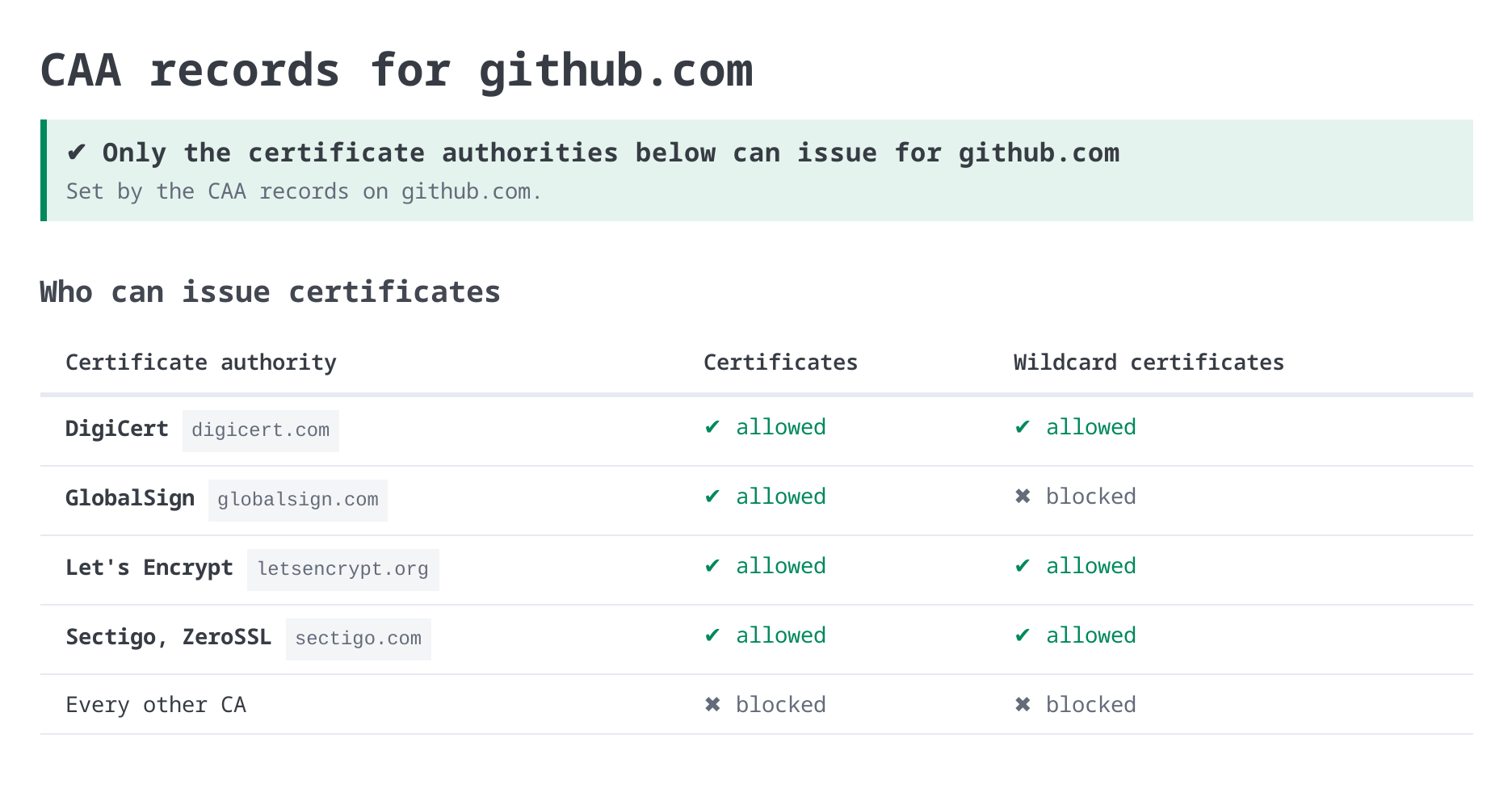
You might want to update those records, so we also created a CAA record generator. Pick the CAs you want to allow, set single names and wildcards separately, and add addresses for violation reports if you want them. It writes the records in a table and in zone file format, ready to copy.
Run your domains through it before you change CAs, or before you add a second CA as a backup. The page also has the CAA value each CA uses, and an example that limits a CA to one ACME account.
Monitor by IP address or alternate hostname
A certificate might be installed on ten servers, but that doesn’t mean all ten servers have the latest version.
If those servers sit behind a load balancer, monitoring the public hostname only checks whichever server the load balancer happens to select. You could have nine servers with the right certificate and one that’s about to expire, and never know it.
You might also have internal servers that answer at one hostname but serve certificates for a completely different domain. Some appliances don’t have DNS names at all.
CertKit can now monitor a server by IP address while checking the certificate for a different hostname.
Each monitored host has a Server Name Indication (SNI) setting under Advanced Options. Set the host address to the IP address you want to connect to, and set the SNI name to the hostname on the certificate.
CertKit connects directly to that address, requests the certificate for the specified hostname, and verifies that the certificate is valid for that name.
Now you can monitor every node individually, even when they all serve the same public hostname.
It works for internal hosts too, with agent version 1.15.0 or later. The monitoring docs have the details.
8 new deployment templates
| Platform | What CertKit updates |
|---|---|
| Synology NAS | DSM (DiskStation Manager) certificates for all services or only the services you select |
| ManageEngine ADSelfService Plus, ADManager Plus, and ADAudit Plus | HTTPS certificates, including automatic service restart and rollback if the new certificate isn’t served |
| ManageEngine Endpoint Central | The certificate used by the web console and agents |
| Aruba Central | Certificates in Classic Central and the new Central, preserving existing certificate assignments |
| Aruba AOS-CX | Switch certificates for the web interface, captive portal, RadSec, and other services |
| VMware UAG (Omnissa) | Now supports ECC (elliptic curve) certificates too |
ADSelfService Plus is the portal people use to reset a forgotten password. When its certificate expires, the people locked out of their accounts are also locked out of the fix.
We’ve shipped even more since our last integrations roundup, including SIP TLS certificates on Cisco CUBE, Total Uptime cloud load balancers, and a Windows Apache template you can select manually.
That’s 99 built-in deployment templates in CertKit as of November 18. Every template is included on every plan.
Available now
The CAA checker and generator are free for everyone, no account required. The new monitoring capabilities and deployment templates are available in every CertKit account today. CAA record checking and monitoring by alternate hostname move to Completed on the roadmap.
CertKit automates certificate lifecycle management so a CAA record nobody remembers doesn’t stop your next renewal.