Abstract
How do we keep our Sonicwall certificates up to date as certificate lifetimes get shorter? We’re already at 200 day certs with 100 then 47 day certificates coming soon. A certificate you used to touch once every year now needs replacing up to twelve times a year.
Doing this by hand is out of the question, no one has the time. Even if they did, the frequent updates is just asking for mistakes.
Luckily, this can be automated using the SonicOS API. Not so luckily, the SonicOS certificate import API is poorly documented and changes between SonicOS versions. This post covers the main roadblock we ran into while building our certificate deployment automation for the CertKit Agent.
When does SonicWall need PKI certificates?
A firewall isn’t primarily a web server, but it still needs publicly signed certificates. The most important use case for our customers is VPN termination and authentication.
SSL VPN
The SSL VPN portal (and the NetExtender / Mobile Connect clients hanging off it) negotiate secure connections using the configured server certificate. If that cert is self-signed or expired, many clients refuse to connect at all.
IPSec VPN
While IPSec does not expose a portal like SSL VPN, it still sometimes needs a publicly signed certificate. SonicWall supports an authentication method called IKE using 3rd Party Certificates for IPSec tunnels (both site-to-site and tunnel-interface). Instead of a pre-shared key, each gateway presents a certificate during the connection, and the peer is authenticated based on whether the certificate is valid and matches the host being connected to.
Certificate authentication is often easier to configure and maintain than pre-shared keys. There are less moving parts and less settings that need to be synchronized between all VPN peers.
The SonicOS API, in theory
SonicOS exposes a REST API as an alternative to the CLI. SonicWall publishes an API specification hosted right on your firewall (links are in the admin UI).
The problem is, the documentation is not complete. The certificate import endpoint’s address is specified, but the details of what you actually have to send it are not described at all.
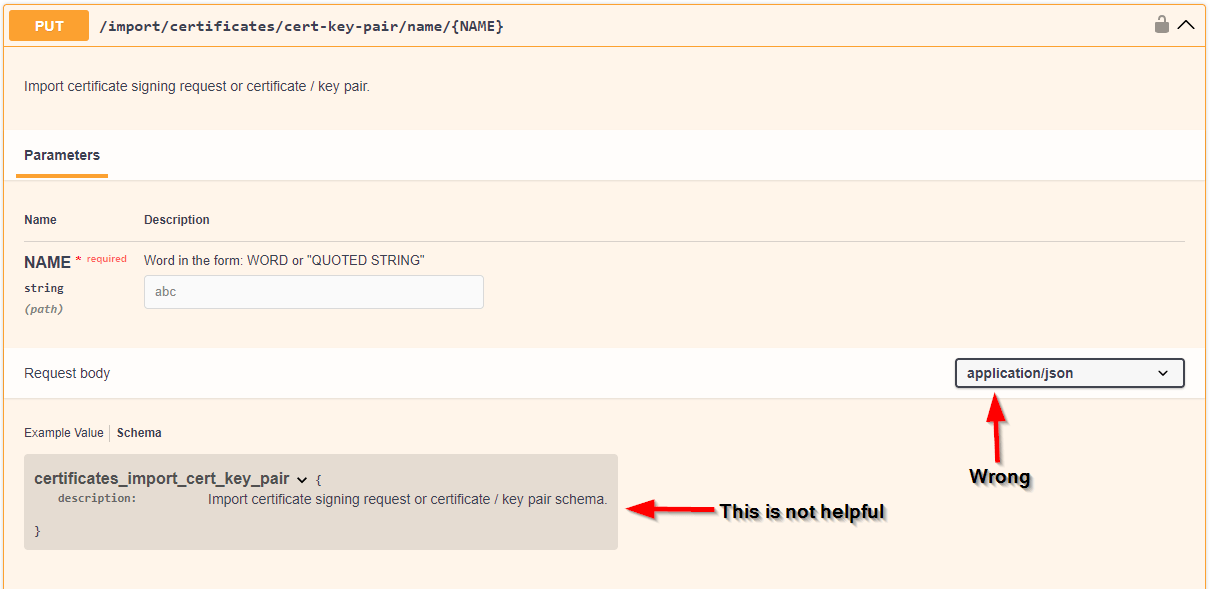
SonicOS 7.3.x Swagger Docs: Thanks for the help, SonicWall.
To top it off, the certificate import API subtly changed between SonicOS 7.1.x and 7.3.x versions.
Certificate Import API - SonicOS 7.1.x
While the documentation for both 7.1 and 7.3 are equally incomplete, we have the advantage of a larger body of SonicWall victim user knowledge to help us with 7.1.
After some digging, we were able to work out exactly what an import request needs to look like on 7.1: the right address, the right method, and a request that bundles up the certificate file along with the password needed to unlock it.
Certificate Import API - SonicOS 7.3.x
Since we know how 7.1 works, 7.3 should be easy! There’s just one small difference: the way you address the request has changed, and the place where the certificate’s password used to go is simply gone. Sending the 7.1 request to 7.3 results in a “404 Not Found” returned by the firewall.
Somehow we need to send the password another way. When we send the rest of the 7.1 style request to 7.3’s endpoint, we get the failure message, “Certificate import failed”.
Reverse Engineering the Admin Dashboard
The docs are no help, but we know that certificate import works from the Administration UI. Watching exactly what the browser sends while uploading a certificate through the UI is our last hope.
This works! The UI is in fact using the same API as the documentation. Watching it in action reveals that the password has to be tucked into the request alongside the certificate itself.
With our new found knowledge from watching the UI, the shape of the import request has changed: same idea as before, but the password now rides along inside the request instead of being part of the address.
Can this new request be used in both versions? No, sending this new request to a 7.1 firewall results in a “incomplete request” error. Since some customers have both 7.x versions, any update logic needs to be able to detect the version being updated before making the certificate update call.
Not just a few firewalls
So we have the basics of automating certificate imports on SonicWalls. All it took was a bit of digging, a fair amount of frustration and a bunch of fiddly logic. But Sonicwalls are not the only hardware you manage. In fact, hardware is probably not the only thing you manage. Many software services need certificates too.
Now rinse and repeat with every other piece of infrastructure you manage. Throw in some software and firmware updates and you’re on a constant maintenance treadmill.
This is the kind of breakage certificate distribution is full of. Every appliance has its own API, quirks and occasional undocumented change. Deploying the cert is the part nobody automated because it wasn’t important until now.
Let CertKit do this for you
As your infrastructure evolves, your home built automation will break. Do you really want to become the full time maintainer of your certificate automation menagerie?
You don’t have to build and babysit a SonicOS integration. This is not the job you signed up for. CertKit was built specifically to solve this problem. Our platform issues and renews certificates, the and the CertKit Agent deploys them where they need to go, SonicWalls included.
Let us keep up with the API churn so you can focus on your actual job.
Start a free trial or book a demo and never worry about expiring SonicWall certificate again.
CertKit automates certificate lifecycle management so getting certificates onto your SonicWalls is a solved problem.