Abstract
Certificate automation does a lot of work on your behalf. Agents running on your servers, talking to certificate authorities, deploying certs to your infrastructure. At some point someone (your CISO, your auditor, or your own brain at 3am) is going to ask: what exactly happened, and when?
Today we’re shipping audit logs.
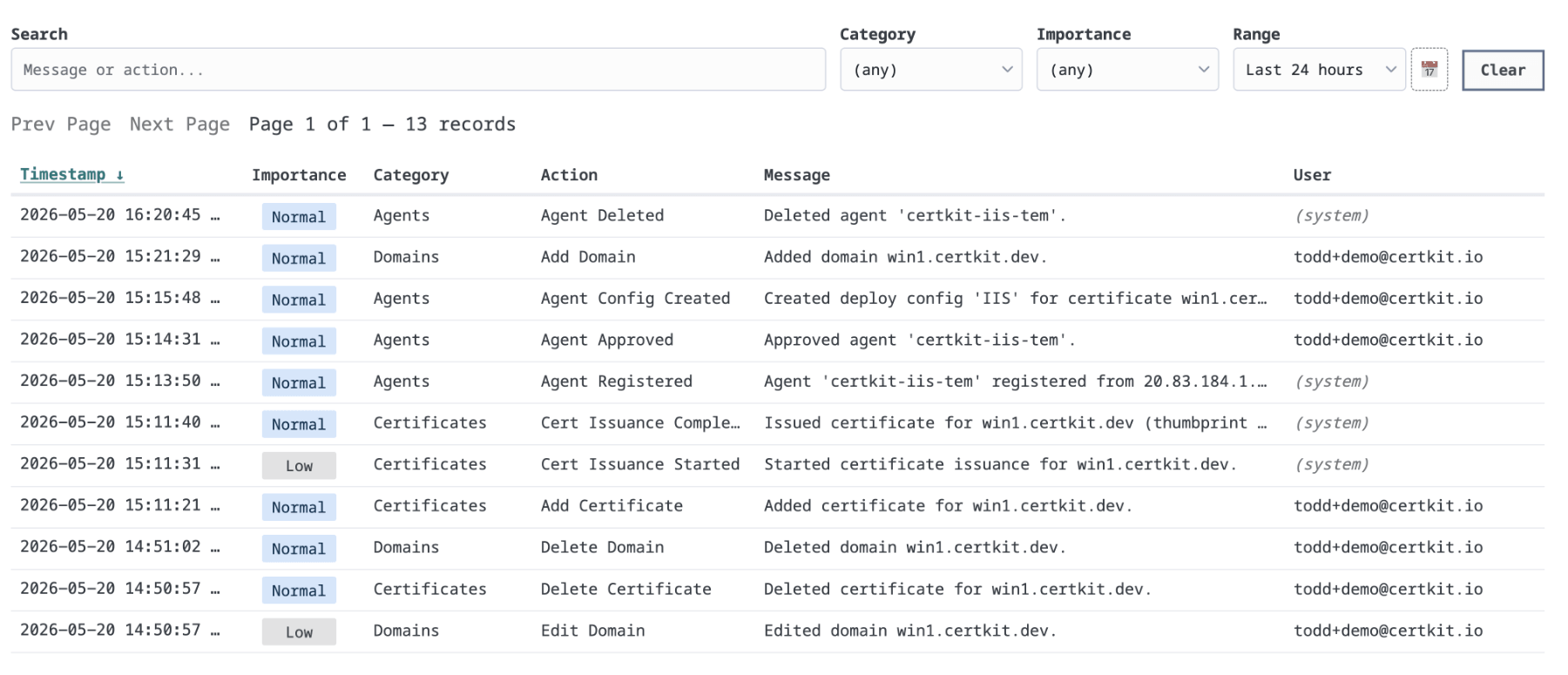
Every action taken in CertKit is now recorded: logins, invitations, certificates added, issued, renewed, revoked, and deployed. Agent registrations, approvals, and config changes. Domain additions and deletions. All of it, timestamped, attributed to the user or system that triggered it.
We also flag importance. Most events are routine: a cert renewed on schedule, an agent checked in. But some actions have real consequences, like a certificate deleted or an agent approved to run on your infrastructure. Those get marked so you can filter down to what matters instead of scrolling through noise.
The logs are searchable by message or action, and filterable by category, importance, and time range. For a compliance review or an incident you need to reconstruct, you can get to what you need quickly.
Audit logs are available now for Business and Enterprise customers. If you’re on a lower plan and need this, reach out.
See the roadmap for what’s coming next.
CertKit automates certificate lifecycle management, so knowing what happened and who did it is never a mystery.